Understanding Technology
Understanding Technology
EasyRPA is an automation platform designed to optimize document processing workflow. It combines powerful OCR, machine learning and robotic process automation to extract, classify, and validate structured data from unstructured documents (like image documents). As a Data Analyst, you’ll use EasyRPA to create datasets, preprocess and recognize documents, train models, evaluate model results and deploy AI-driven automation for tasks like agreements processing, invoice handling, etc.
Key Technologies Used in EasyRPA
Tesseract OCR for Document Recognition
EasyRPA uses Tesseract, an open-source Optical Character Recognition (OCR) engine, to automatically recognize and extract text from scanned or image-based documents. Tesseract OCR can processes a wide variety of document types including invoices, forms, and correspondence and supports more than 100 languages recognized out of the box.
For each document, pages are first converted into images using ImageMagick, often with additional pre-processing scripts to enhance image clarity and improve recognition results. Tesseract then converts these document images into machine-encoded text and structured HOCR formats. This digitized text can be post-processed, for example, to correct common recognition errors, ensuring higher accuracy for downstream automation.
By integrating Tesseract, EasyRPA allows Data Analysts to automate document recognition tasks without the need for custom code or complicated setup. The OCR workflow is fully automated, enabling fast extraction of textual data from scanned or photographic documents.
The OCR pipeline in EasyRPA consists of three essential steps:
Image Pre-processing:
Each document is split into pages and converted to images using ImageMagick, with optional enhancement scripts to improve recognition quality.Text Recognition:
Tesseract OCR processes the images, extracting text and generating machine-readable formats (plain text and HOCR).Post-processing:
Recognized text is optionally corrected for common errors to ensure reliability for further automation and analysis.
Input: JSON message describing the document(s) to OCR, including paths or encoded files and configuration parameters.
Output: extracted plain text, HOCR files with structured text/position data, processed image and JSON structure.
Recognized text from an invoice scan image:
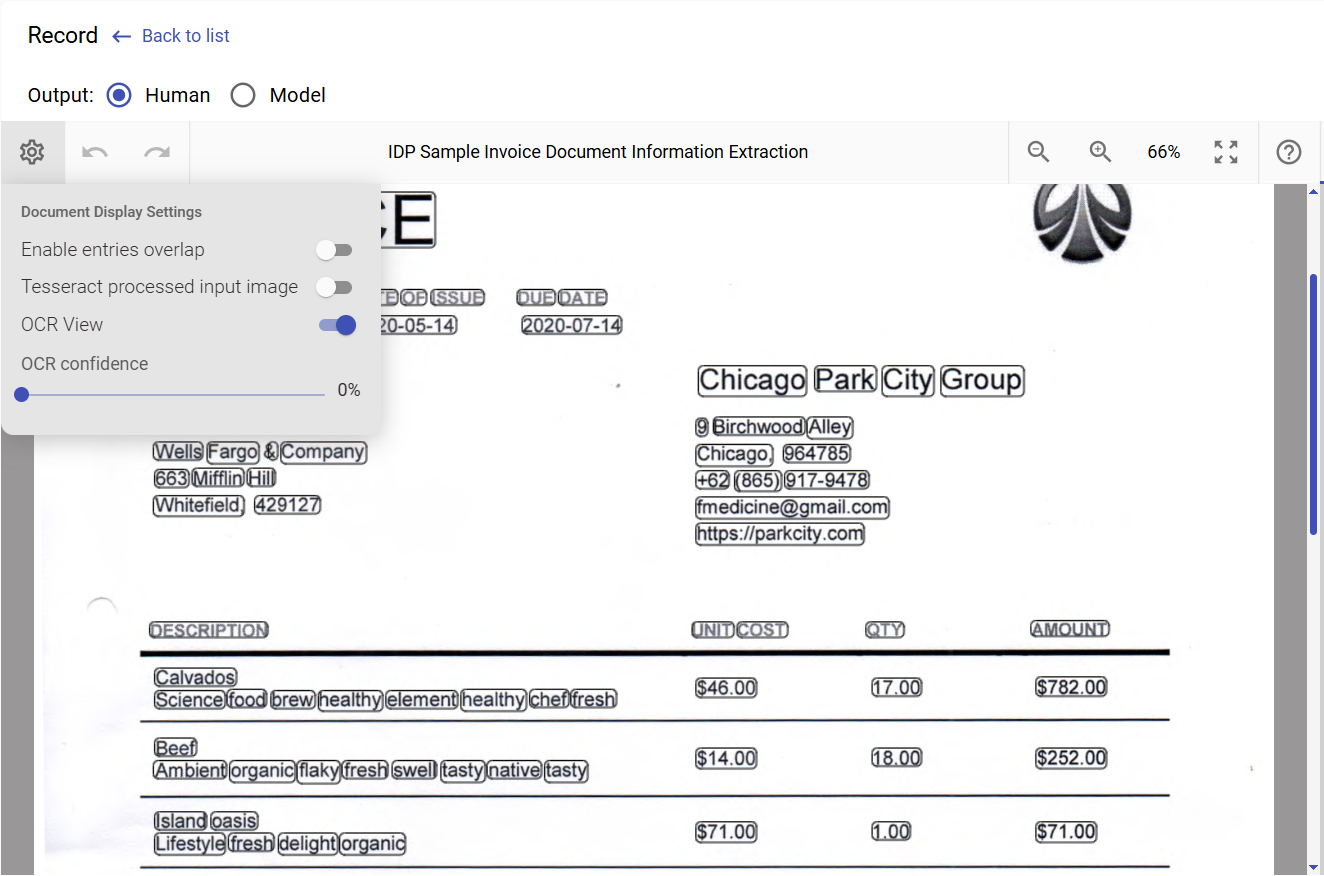
Example of ImageMagick and Tesseract settings in JSON:
To explore the OCR image processing pipeline and test available options, you can use Optical Character Recognition Sample Process (OCR Sample).
To read more about techniques of OCR quality analysis and improvement, see OCR Tuning Guide.
RPA for Workflow Automation
EasyRPA Control Server acts as the orchestration layer for automating workflows. From Data Analyst perspective, key capabilities where automation processes are used include:
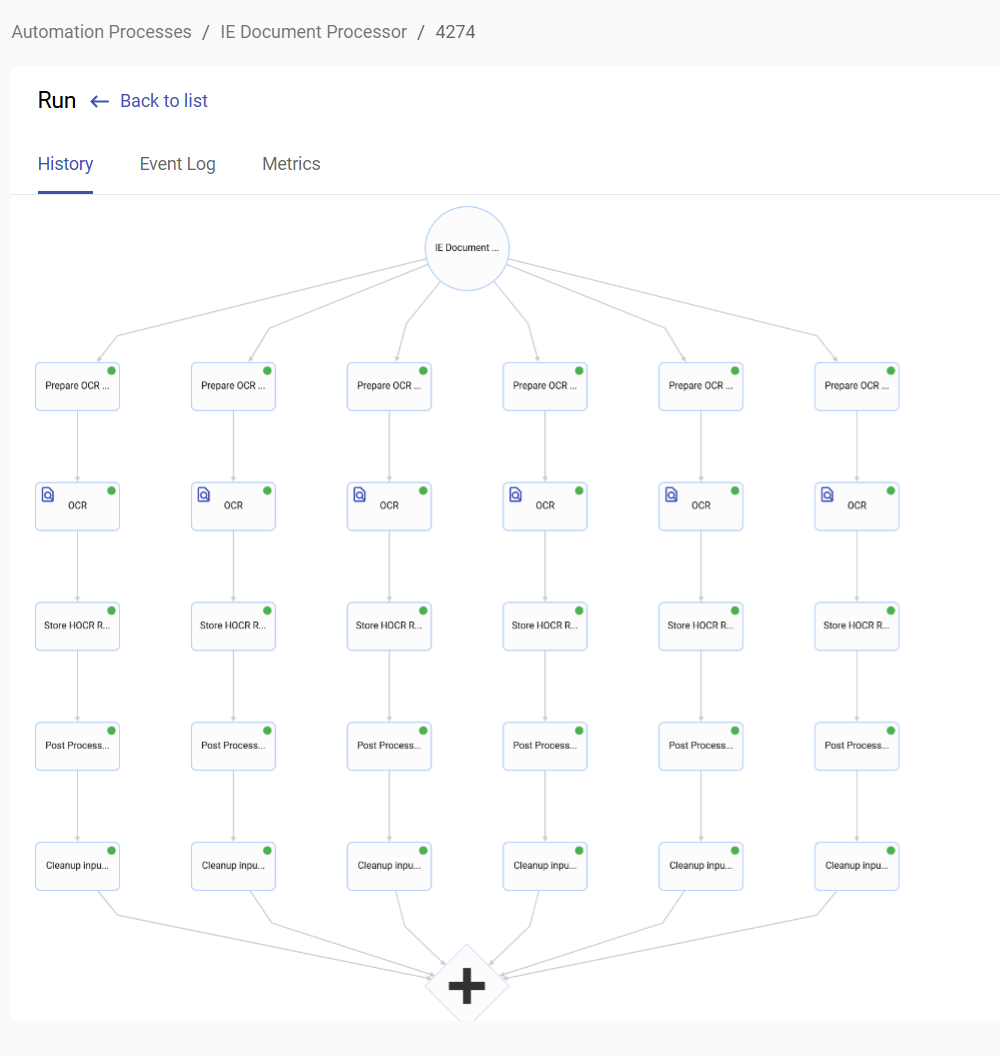
Document Processing: Automatically pre-process and OCR documents, then route them to a workspace where human tasks are generated for tagging or validation.
Model Execution: Run trained machine learning models on test datasets and generate performance reports for analysis.
These automation processes can be initiated directly from the user interface. Every step taken by an automation process in EasyRPA is logged and Data Analysts can always trace how a result was achieved.
Automation processes can import / export data from external systems such as email, databases, and APIs, enabling end-to-end automation in production environments.
Automation process to pre-process and OCR image documents:
Machine Learning (ML) for Information Extraction and Classification
EasyRPA uses SpaCy, an NLP library, to train machine learning models for Named Entity Recognition (NER) and Document Classification. These models enable structured data extraction from unstructured documents (e.g., invoices, contracts, emails) and automate classification tasks. Data Analysts play a key role in preparing high-quality training data to ensure model accuracy.
Key Concepts for Data Analysts:
Classification and Information Extraction
These are two critical document processing tasks EasyRPA ML-powered automation is used for:
- Classification (CL): organizing documents into predefined categories. This includes:
- Binary Classification (e.g., spam vs. not spam, fraud vs. legitimate)
- Multi-Class Classification (e.g., invoice types: service, product, expense)
- Multi-Label Classification (e.g., a document tagged as both "contract" and "confidential")
- Imbalanced Classification (e.g., fraud detection, where most transactions are normal)
Example Use Cases: Email filtering, document routing, page-level categorization in multi-page files.
- Information Extraction (IE): extracting structured data (e.g., invoice numbers, dates) from unstructured/semi-structured documents. Each extracted piece of data is a "field" (e.g., supplier_name, total_amount).
Example Use Cases: Invoice processing (extracting vendor details, line items), claim forms (policy numbers, dates), or auto-filling databases from scanned documents.
Document Sets (DS)
A document set is a collection of tagged documents (e.g., PDFs, scanned images) used to train or test models. To tag the documents for machine learning in an appropriate way a Data Analyst needs:
- For Classification: Assign a single category (e.g., "Invoice," "Contract") per document.
- For Information Extraction: Tag specific text spans (e.g., invoice_number, total_amount) within documents.
Human Task Types (HTT)
EasyRPA provides built-in interfaces for tagging:
- Classification HTT: Assign document categories.
- Information Extraction HTT: Highlight and tag entities (e.g., dates, amounts) directly in documents via Workspace UI.
Example: Data Analysts tag vendor names in 100+ invoice scans to train an IE model.
Training Data Preparation
Data Analysts must ensure labeled examples are consistent and representative of real-world variability. There should be minimum ~50-100 tagged documents per category/entity for baseline performance.
The supported input formats include:
hOCR (scanned documents post-OCR).
HTML (web pages or digital text).
Supported Model Types
| Model Type | Use Case Example | Notes |
|---|---|---|
| Classification | Sorting invoices vs. receipts | Uses ml_cl_spacy3_model trainer (multi-class support). |
| Information Extraction | Extracting invoice numbers/dates | Uses ml_ie_spacy3_model trainer (supports dynamic language loading). |
| Custom Models | Signature detection, QR code parsing | Pre-trained models (e.g., ml_signature_detection_yolo5_model). |
ML Workflow for Data Analysts in EasyRPA
Step 1: Upload documents to a Document Set interface in EasyRPA.
- Step 2: Pre-process and OCR documents.
Step 3: Tag documents via the Human Task in Workspace (Classification or IE tasks).
Step 4: Export tagged data as a training set (automatically formatted for SpaCy).
Step 5: Collaborate with developers to train models using the
ML Containerservice.- Step 6: Validate trained model results on a test set.
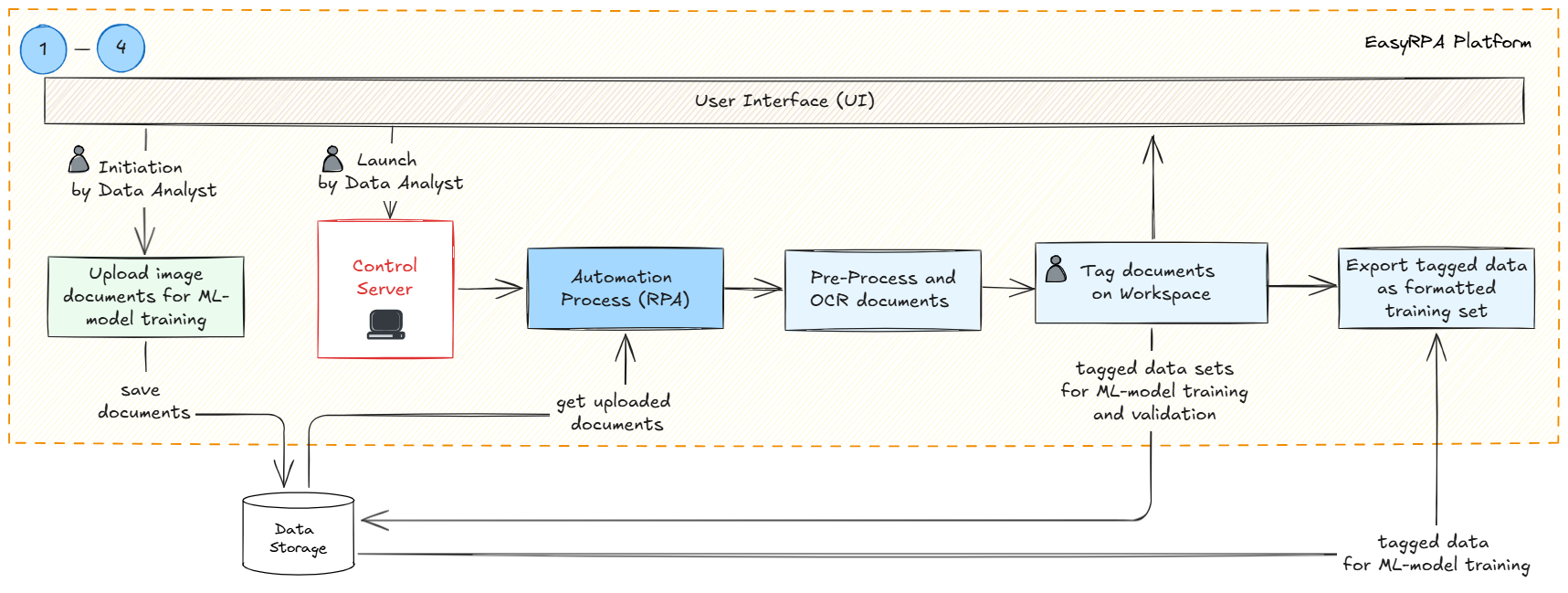
The entire process begins when a data analyst initiates the workflow and uploads the documents that will be used for ML-model training in Document Set user interface of EastRPA, the documents are saved to Data Storage (MinIO). Next Data Analyst launches an Automation process that will handle the bulk processing of the documents including pre-processing documents for quality enhancement, OCR to extract text from the images. Processed documents are then tagged and in Workspace. The final output is a formatted training set exported from the tagged documents. This structured data is now ready for ML model training.
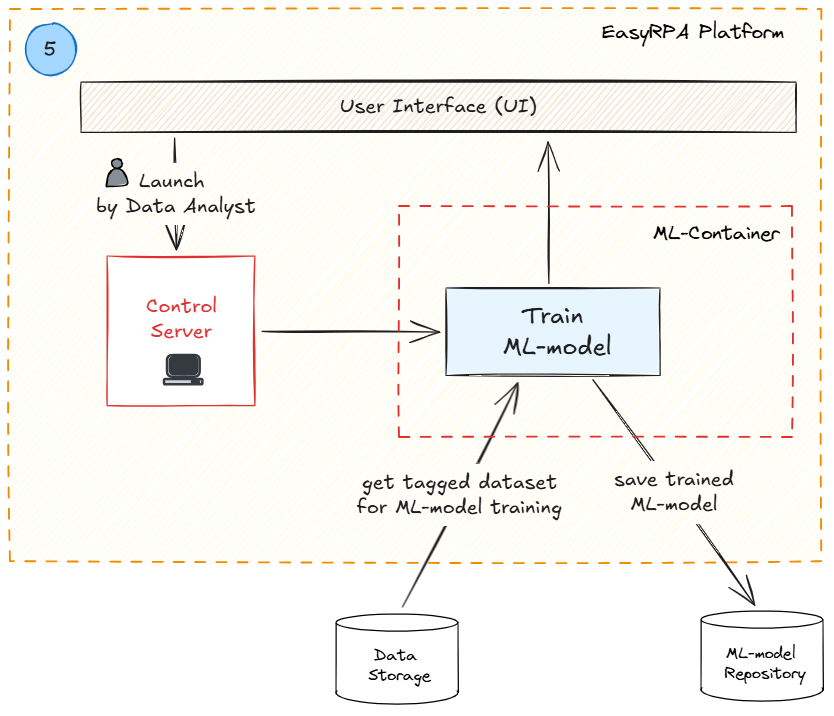
Data Analyst in collaboration with Developers initiates ML-model training (Classification or Information Extraction). Once training is complete, the finalized ML model is saved. The trained ML-model can be used in production or further fine-tuned according to the model validation results in the next step.
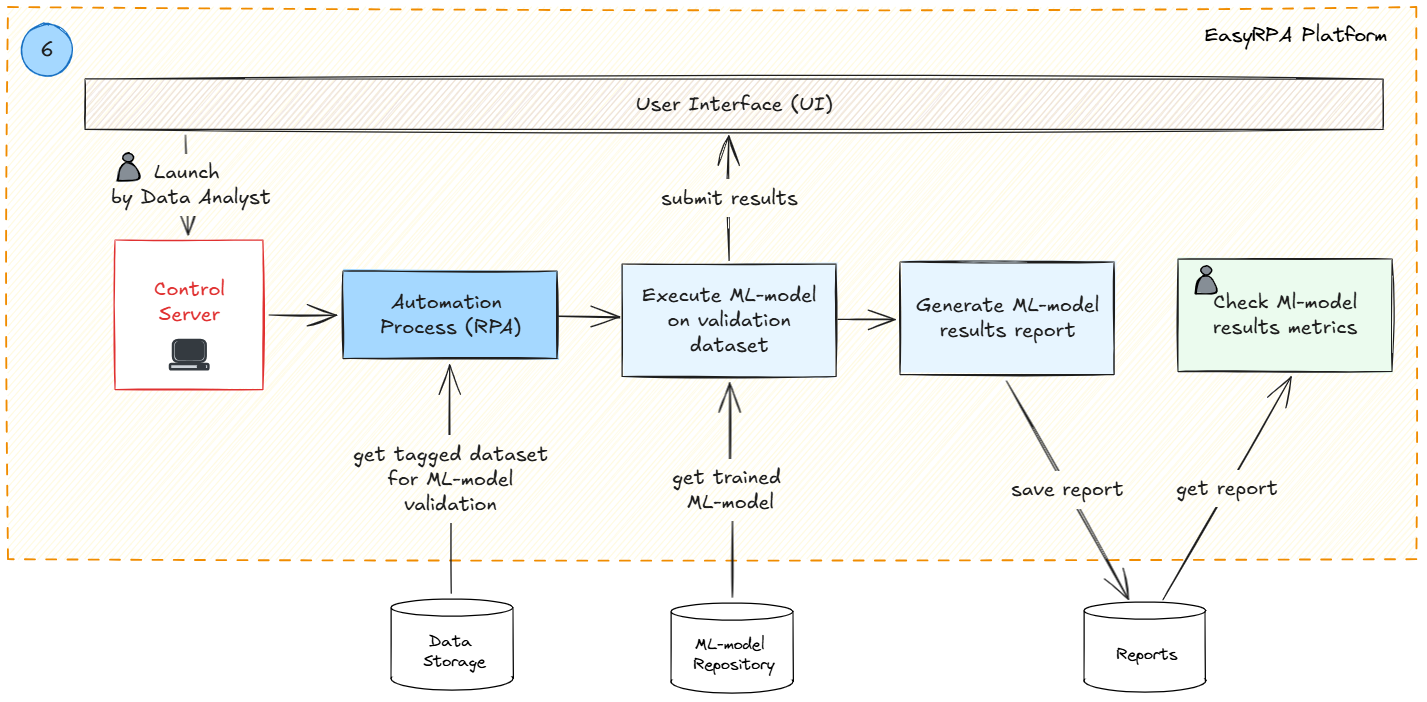
Next comes post-training validation step where data analysts evaluate ML model performance before deployment. data Analyst initianes the automation process where trained ML-model is executed on a tagged test set. Key indicators (accuracy, precision, recall, etc.) are calculated and the system generates ML-model results report. Data Analyst reviews the generated report and makes a decision (in collaboration with Stakeholders if necessary) to initiate next steps (model deployment in production or retraining for results improvement). If ML-model performance improvement is required the workflow repeats from step 1 with additional documents for training and validation.
Using Trained ML Models in Production and Auto-retraining Process
Production Deployment of ML Models
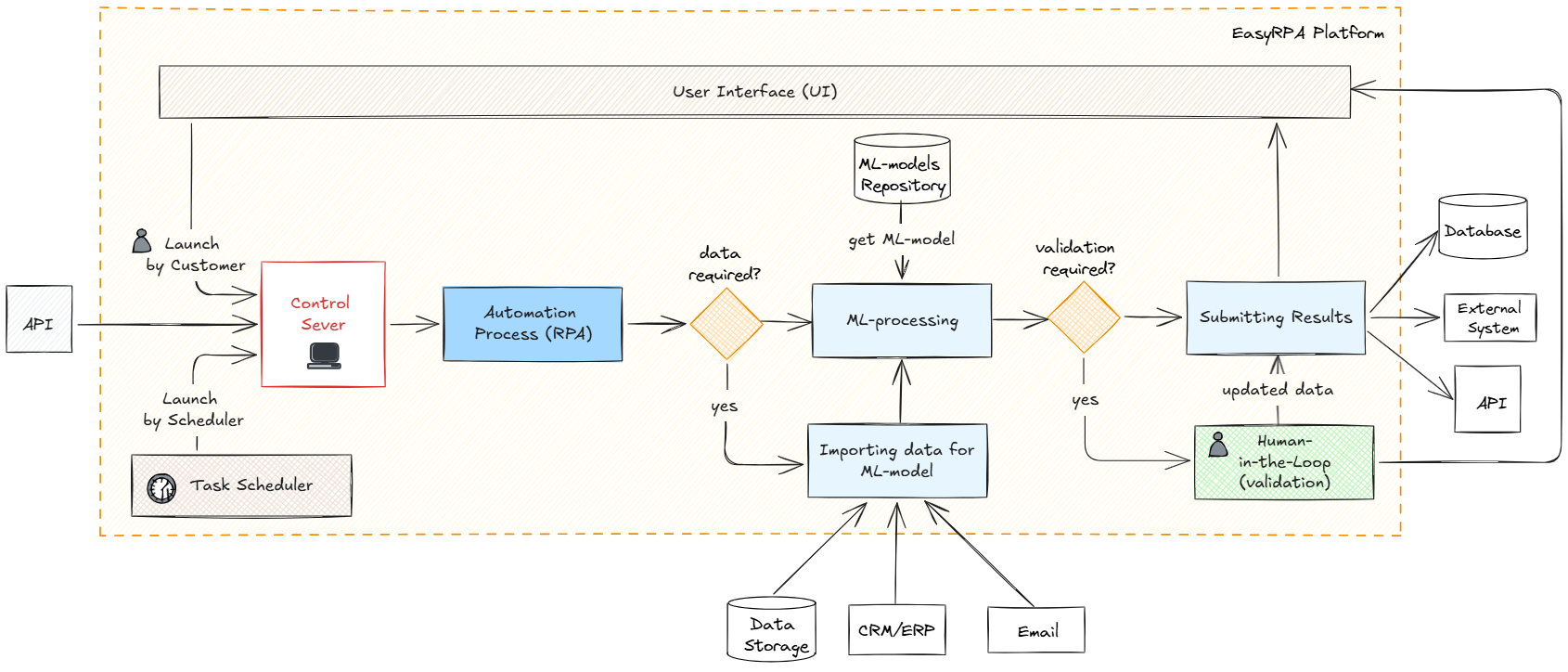
Once models are validated, they can be deployed to production environments where they process real documents automatically. The production workflow combines tasks of documents pre-processing, OCR, ML classification and /or information extraction in an end-to-end automated pipeline. The automation process can be launched via API call, scheduler task or can be manually launched by the user.
Document Ingestion:
Documents can arrive through various channels such as email, CRM/ERP systems, or direct uploads from Data Storage. These are automatically routed into the processing pipeline without manual intervention.Automated Processing:
Pre-processing steps include applying ImagMagick enhancements and OCR (Tesseract) to convert scanned images to machine-readable text.
The trained ML classification model then categorizes the documents and / or information extraction model(s) pull out structured data fields based on the classification.
Business rules validate the extracted data to ensure accuracy and compliance.
Output Generation:
The finalized structured data is exported to downstream systems for further use, while documents are archived. The system also records confidence scores and detailed processing logs.Human-in-the-Loop Verification (If Needed):
Documents or data points with low confidence scores are flagged for manual review and Human Tasks are created in the Workspace to check the documents.
Auto-Retraining Process
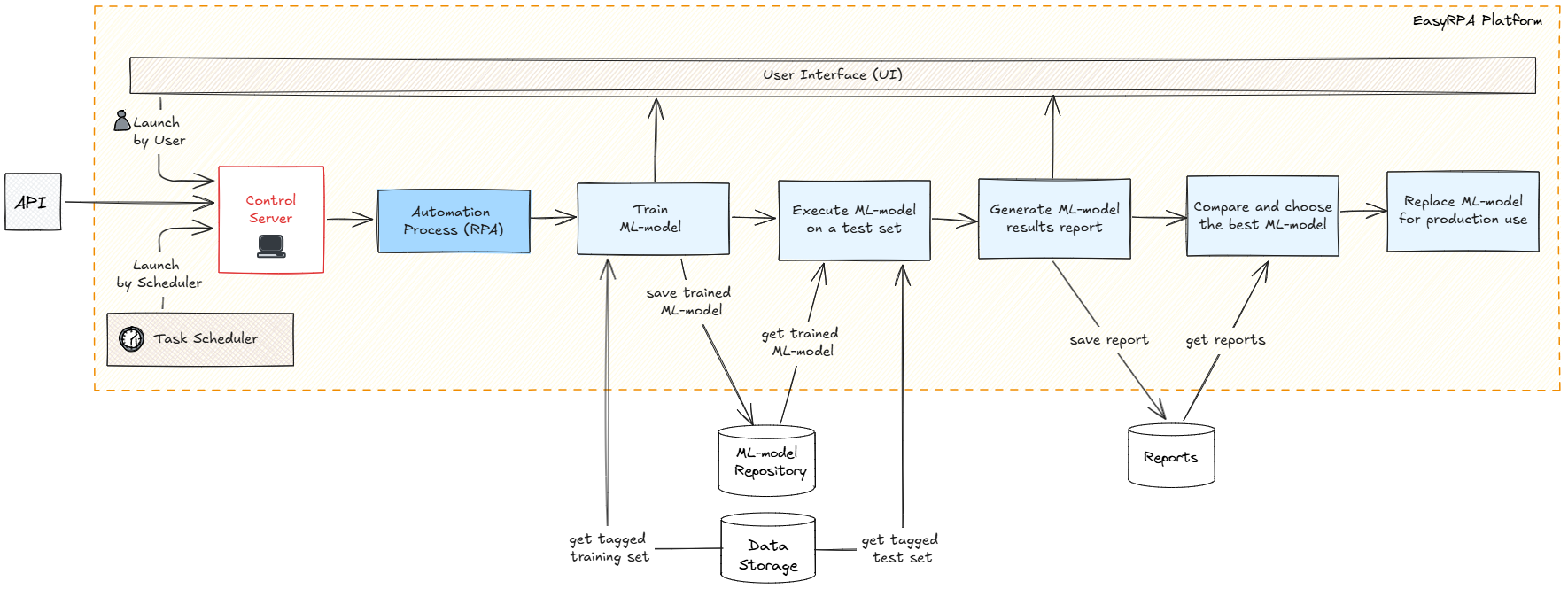
EasyRPA supports an automated model retraining workflow to adapt models to new document types and layouts which can appear during production use. This enables models to stay accurate and relevant without disrupting ongoing business operations.
Auto-Retraining Workflow:
- Sample Collection:
When new document patterns are detected a Data Analyst in collaboration with Subject Matter Experts collects representative samples of these documents and approves selected documents to be added for model training. Dataset Preparation:
Data Analyst tags the approved documents and adds them into the previously existing dataset.Model Retraining:
When ML-model autoretrain process is launched the expanded data set is automatically partitioned into training and test sets according to the provided configuration parameters. Using the updated training set, a new version of the model is trained within the ML Container. It undergoes validation, and its performance metrics are compared against the previous model to ensure improvements.Model Promotion:
Once the new model demonstrates satisfactory or improved performance, it gets flagged as "best model" and the previous model is replaced with the new one for the production use. Model Retraining and Model Promotion steps are handled by an automation process.
The integration of automated retraining with continuous production usage ensures that EasyRPA’s machine learning models stay up-to-date and maintain high accuracy without interrupting critical business processes.
Human-in-the-Loop (HITL)
EasyRPA supports Human-in-the-Loop (HITL) approach that combines automated processing with human expertise. EasyRPA integrates Human-in-the-Loop into the automation process using Human Tasks in its Workspace application. In production flow HUTL is incorporated into the automation processes the following way:
- Uncertainty Handling:
If the ML model encounters uncertainties (ambiguous classifications) or exception conditions occur (poor quality scans, missing data), these cases are flagged for human review. - Human Validation:
Using the Workspace application, human operators review flagged documents, validate or correct extracted data, and classify them appropriately. - Feedback Loop:
The corrections made by human operators are sent back to the system, they can be used feedback to retrain and improve the ML model over time.