Streamlining Document Processing
Streamlining Document Processing
Problem Statement
Many companies handle vast amounts of paperwork daily, including invoices, agreements, applications, claims forms, and compliance documents. Manual processing is time-consuming, error-prone, and inefficient. Employees must:
- Sort and file documents manually
Enter data into internal systems
Cross-check information across multiple platforms
Resolve discrepancies in records
To address these challenges, companies are turning to automation solutions that combine optical character recognition (OCR) and machine learning (ML) to digitize and process documents efficiently.
The Role of Subject Matter Experts and Data Analysts
Successful automation requires deep domain expertise. Subject Matter Experts from the company work alongside Data Analysts from the automation partner to:
Explain document workflows
Identify critical data fields
Define validation rules
Since each company has unique document formats, client requirements, and compliance rules, the SME’s guidance is essential in building an effective solution.
Case Study: Automating Claims Processing for a Global Insurer
A leading insurance provider faced significant inefficiencies in processing claims. Their workflow involved:
3,200+ documents daily
Over 250 employees manually handling claims
Multiple document types from various sources
Key Challenges:
Document Variety – 12 different document types (9 processed daily, 3 monthly).
Volume Priorities – 85% of the workload came from 3 key document types.
Data Validation – Certain forms (e.g., claim forms and medical reports) required cross-referencing.
Vendor Diversity – Documents arrived from 20+ healthcare providers in varying formats.
Multilingual Content – Forms submitted in 6 languages (English, French, Spanish, German, Mandarin, Arabic).
The Solution: ML-Enhanced OCR for Document Processing
To automate the workflow, the insurer adopted an ML-powered solution.
Implementation Steps:
Document Tagging & Training
SMEs and Data Analysts reviewed each document type to identify key fields.
ML models were trained to recognize and extract structured data.
Validation Rules & Business Logic
SMEs defined rules for cross-checking data (e.g., matching claim amounts with policy details).
Data Analysts configured automation workflows to flag discrepancies.
Integration with Existing Systems
Extracted data was fed into the insurer’s policy management system.
Automated alerts were set up for exceptions requiring human review.
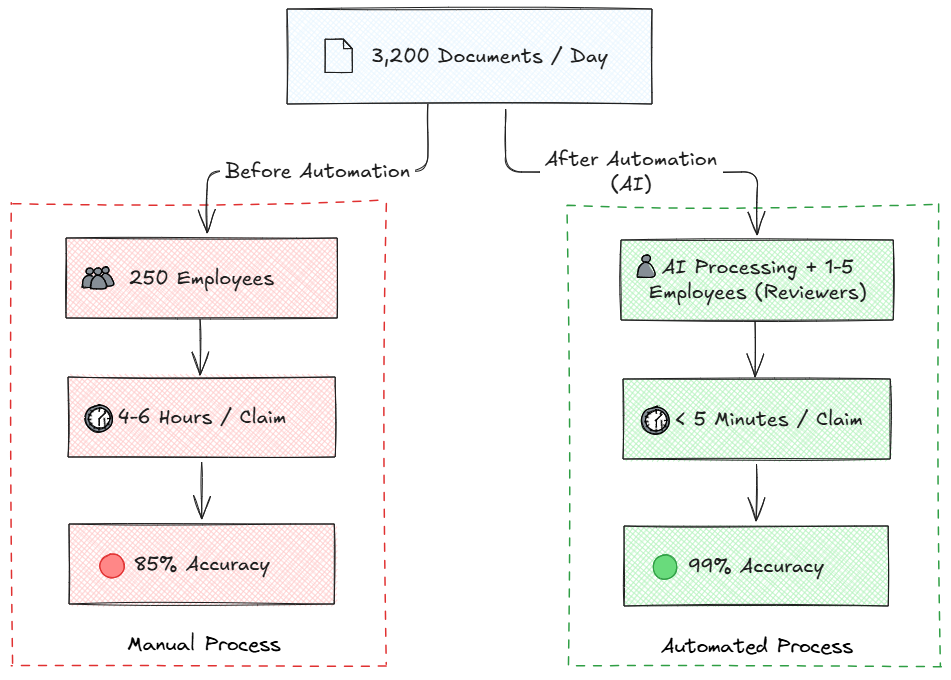
Next Steps: Optimizing the Workflow
With the foundation in place, the insurer could:
Reduce manual data entry by 98%%
Cut processing time from hours to minutes
Improve accuracy by eliminating human errors
By employing OCR and ML, the insurer transformed a manual process into an efficient, error-resistant workflow.
Move further
Now, it's time to learn more about the specific roles of the Data Analyst and the Subject Matter Expert and how they can most effectively collaborate. Next, we will learn how to build the process from their collaboration in the Workspace application.