Document Processors
Document Processors
- Overview
- Base Document Processor concepts
- Document Set Processor Flow
- Automation Process Flow
Overview
Document Processors are the Automation Processes classes that children of the eu.ibagroup.easyrpa.ap.dp.AbstractDocumentProcessor class. They could works in 2 modes:
- process documents from a Document Set according to requested actions. In this mode automation process receives document_set_processor_input input parameter and evaluates documents inside Document Set that requested actions (see Document Set).
- process documents as a part of customer automation process. In this mode automation process processes documents according to an implemented logic, that could be a part of customer's story. Platform's document processor have very simple logic, and intended to be used as a base for custom extensions. This greatly decreases time and code for implementation of customer's business processes.
The goal of the article - provide technical information about platform's document processors, to allow use them more effectively during implementation of customer's automation processes.
Base Document Processor concepts
Platform Document Processor
Platform provides only one AbstractDocumentProcessor implementation - eu.ibagroup.easyrpa.ap.dp.DocumentProcessor. It uses document type to obtain correct task/action flow. The main purpose of the processor is to handle default flow of processing for Document Sets.
Platform's rpaplatform nexus repository contains eu.ibagroup:easy-rpa-aps automation process package, where all necessary ML tools are (document processor, human task types, additional models). It also contains code of platform's document processor.
	 <dependencies>
		 . . . .
		<dependency>
			<groupId>eu.ibagroup</groupId>
			<artifactId>easy-rpa-aps</artifactId>
			<version>${rpaplatform.version}</version>
		 </dependency>
		 . . . .
	<dependencies>
To start using this Document Processor in document sets, please see details here.
Document Set Processor Input
The document_set_processor_input input parameter is JSON serialization of the eu.ibagroup.easyrpa.cs.controller.dto.DocumentSetProcessorInput class, here is a sample JSON:
{
	"@type": "eu.ibagroup.easyrpa.cs.controller.dto.DocumentSetProcessorInput",
	"uuids": {
		"@type": "java.util.ArrayList",
		"@items": [
			"c7ac32c6-41dd-40d7-b025-914b48ada78e"
		]
	},
	"actions": {
		"@type": "java.util.ArrayList",
		"@items": [
			"PREPROCESS",
			"EXECUTE_MODEL",
			"SET_MODEL_OUTPUT_AS_HUMAN"
		]
	},
	"documentSetId": 1016
}
where:
- uuids - the list of (String) document uuds need to be processed
- actions - the list of (String) actions that should be done across the list of documents.
- documentSetId - the document set id, where the documents are located.
Document
The base document class is - eu.ibagroup.easyrpa.ap.dp.entity.DpDocument. Here is the list of base fields:
| field | column | type | description |
|---|---|---|---|
| uuid | uuid | String | the document unique identifier |
| name | name | String | human friendly document name |
| notes | notes | String | human friendly document notes to show |
| status | status | String | document current status |
| url | url | String | document accessible url |
| s3Path | s3_path | String | path on storage |
| ocrJson | ocr_json | OcrTaskData | platform OCR result for document (applicable for document that uses OCR transformation) |
| inputJson | input_json | Map | document input JSON for Human Task editor |
| outputJson | output_json | Map | document result JSON after Human Task editor |
| modelOutputJson | model_output_json | Map | document result JSON after Model execution, i.e. what model does instead of Human |
| autoTrainingJson | auto_training_json | AutoTrain | JSON for auto training |
| isInvalid | isInvalid | Boolean | flag that document is invalid and should be escaped from normal processing |
| updateTimestamp | update_timestamp | Date | document update date |
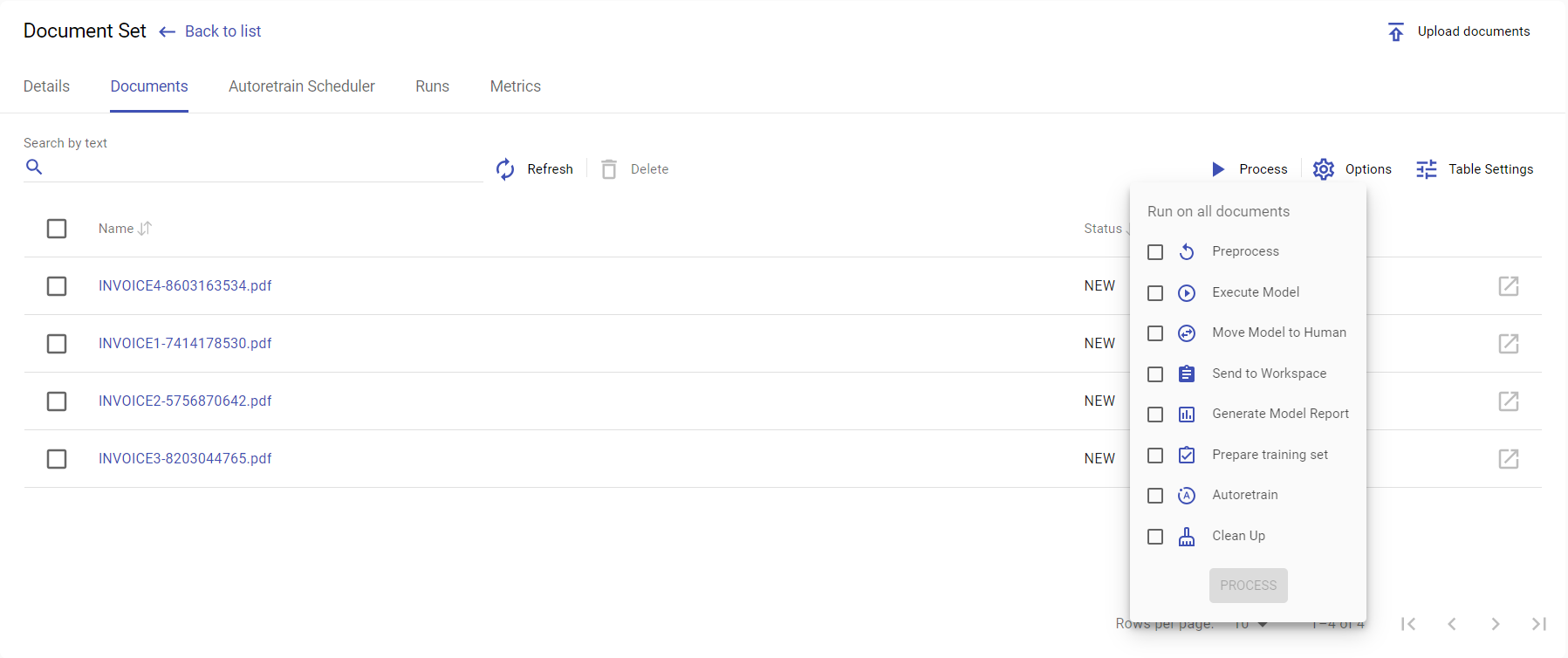
Document Set Actions
The list of actions that current Control Server version could request is defined in the eu.ibagroup.easyrpa.persistence.documentset.DocumentSet.Action enumeration. For now there are:
| action | group | description |
|---|---|---|
| PREPROCESS | false | Takes document source and generates inputJson, i.e. with what Human Task can work with |
| EXECUTE_MODEL | false | Execute model to generate modelOutputJson, i.e. what can replace Human work |
| SET_MODEL_OUTPUT_AS_HUMAN | false | Moves model results as human, modelInputJson→ outputJson |
| EXECUTE_HT | false | Send task on Workspace for Human Work, result will be saved in outputJson |
| GENERATE_MODEL_REPORT | true | Generate model report for all document within uuids, where are isValid and modelOutputJson and outputJson are not empty |
| PREPARE_TRAINING_SET | true | Generates model training set for all document within uuids, where are isValid and outputJson are not empty |
| AUTO_TRAINING | true | perform autotraining for all documents in the document set, there is no any uuids filtering here |
| CLEANUP | true | performs document set cleanup, removes all unnecessary resources on storage, there is no any uuids filtering here |
Document Set Info
Document processor obtains Document Set information using CS API by the following code:
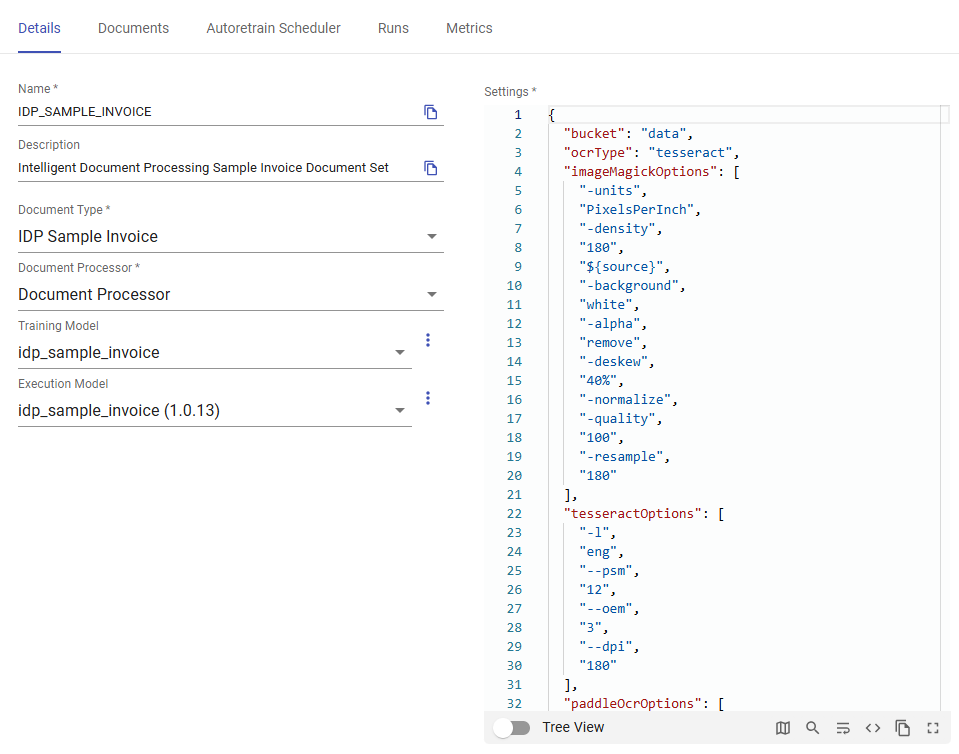
DocumentSetDto documentSetDto = getCsClient().getJson(String.format("doc_sets/document_processing/%s", documentSetProcessorInput.getDocumentSetId()), DocumentSetDto.class);The eu.ibagroup.easyrpa.cs.controller.dto.DocumentSetDto contains Document Set info like models, setting, Document Type and so on:
Document Set Processor Flow
Here are the brief Document Processor (DP) code declaration:
@ApModuleEntry(name = "Document Processor", description = "Universal Document Processor for Document Sets.")
@Slf4j
public class DocumentProcessor extends AbstractDocumentProcessor<DpDocument> implements DocumentProcessorBaseFlows {

	@Override
	public Logger log() {
		return log;
	}

}
A DP is a Automation Process (AP) class (extends AbstractDocumentProcessor) that works with a document that is child of DpDocument (DocumentProcessor<D extends DpDocument>), has all features of document processor base flows (implements DocumentProcessorBaseFlows, DocumentsProcessorBaseFlows). The run method shows possibility to work in 2 modes - DP and AP. The DP mode is defined in the documentProcessor(getInput()) and AP mode in the processRun(getInput()).
DocumentContext
Lets switch to the DocumentProcessorBase class that defines all DP features, and analyze what isDocumentSetProcessorRun does:
public interface DocumentProcessorBase extends DpExecutionFlow {
	. . . . .
	 default boolean isDocumentSetProcessorRun(TaskInput input) {
		return getParameter(input, DocumentSetProcessorInput.class).map(documentSetProcessorInput -> {
			DocumentSetDto documentSetDto = getCsClient().getJson(String.format("doc_sets/document_processing/%s", documentSetProcessorInput.getDocumentSetId()),
					DocumentSetDto.class);
			setParameter(input, new ContextId(documentSetDto.getName()));
			setParameter(input, new DocumentSetInput(documentSetProcessorInput.getUuids(), documentSetProcessorInput.getActions()));
			clearParameter(input, DocumentSetProcessorInput.class);
			return true;
		}).orElse(false);
	}
. . . . .
}
It check that AP input has eu.ibagroup.easyrpa.cs.controller.dto.DocumentSetProcessorInput parameter (i.e. should work in DP mode), if yes it obtains Document Set info and put into input (setParameter(input, new ....)) 2 parameters:
- ContextId - a kind of reference to a Document Set by name, but with a type document set
- DocumentSetInput - that is actually has uuids and actions from eu.ibagroup.easyrpa.cs.controller.dto.DocumentSetProcessorInput without references to a Document Set
ContexId is a key to what DocumentContext to use. A eu.ibagroup.easyrpa.ap.dp.context.DocumentContext class represents document handling context, it defines:
- where the document is stored (f.e datastore, document set)
- on what storage folder files are
- Document class (could be additional fields)
- what its document type to use in Human Task
- what the model to call for ML task
The intension for the DocumentContext - work with document in the same way without meaning where document is stored is. Currently there are 2 implementation:
- documentSet - eu.ibagroup.easyrpa.ap.dp.context.DocumentSetContext
- dataStore - eu.ibagroup.easyrpa.ap.dp.context.DataStoreContext
The ContexId defines the name (datastore/documentset name) of context and type (documentSet/dataStore of implementation class to use). It is quite easy define a new context type - implement eu.ibagroup.easyrpa.cs.controller.dto.DocumentSetProcessorInput and annotate it with ContextHandler annotation. All DocumentProcessor tasks operates with document using DocumentContext (see more details later).
For now it is clear that isDocumentSetProcessorRun method defines DocumentContext with name of document set from input and use DocumentSet as document source.
Any operations under document (or set of documents) in document processor requires ContextId parameter in input. Therefore all processing start with defining DocumentContext.
Switching document context means that you are referring to a different DocumentSet/Model/Storage/DocumentType, i.e. call different model and get/update document in different places. There are methods for create/import/export document into context, see a more details below.
Set parameters for DP methods
We've faced with the setParameter in the code above. The DocumentProcessorBase defines set of useful methods to set/get/clear parameters into taskInput. This is common way to pass arguments into CompletableFuture<TaskOutput> operating methods that construct execution flow.
Here are some set examples:
setParameter(input, new ContextId("TST")); - adds into TaskInput
setParameter(output, new ContextId("TST")); - adds into TaskOutput
execute(input, Task.class).thenCompose(setParameter(new ContextId("TST"))); - adds into TaskOutput of the completed Task
Here are some get examples:
ContextId contextId = getParameter(input, ContextId.class); - gets from TaskInput
ContextId contextId = getParameter(output, ContextId.class); - gets from TaskOutput
There are some clear methods:
clearParameter(input, ContextId.class); - clear in TaskInput
clearParameter(output, ContextId.class); - clear in TaskOutput
execute(input, Task.class).thenCompose(clearParameter(ContextId.class)); - clear in TaskOutput of the completed Task
DocumentProcessor main flow
Lets switch back to the DocumentProcessorBase class and documentProcessor method.
public interface DocumentProcessorBase extends DpExecutionFlow {
 . . . . .
	default CompletableFuture<TaskOutput> documentProcessor(TaskInput rootInput) {
		DocumentSetInput documentSetInput = getDocumentSetInput(rootInput);
		ContextId context = getContext(rootInput);

		CompletableFuture<TaskOutput> executionFlow = emptyFlow(rootInput);
		if (documentSetInput.actionsToProcess(false).size() > 0) {
			executionFlow = executionFlow.thenCompose(split(documentSetInput.uuidsToProcess(), (docInput, uuid) -> {
				// Set single document input context
				clearInput(docInput);
				setParameter(docInput, new DocumentId(uuid));
				setParameter(docInput, context);
				log().info("Processing document {}:{}", uuid, context);
				return executeActionFlow(docInput, documentSetInput.actionsToProcess(false)).thenCompose(executeFlow(CLEANUP_INPUT));
			}).merge()).thenCompose(setParameter(documentSetInput)).thenCompose(setParameter(context));
		}
		return executionFlow.thenCompose(executeActionFlow(documentSetInput.actionsToProcess(true)));
	}
. . . . .
}
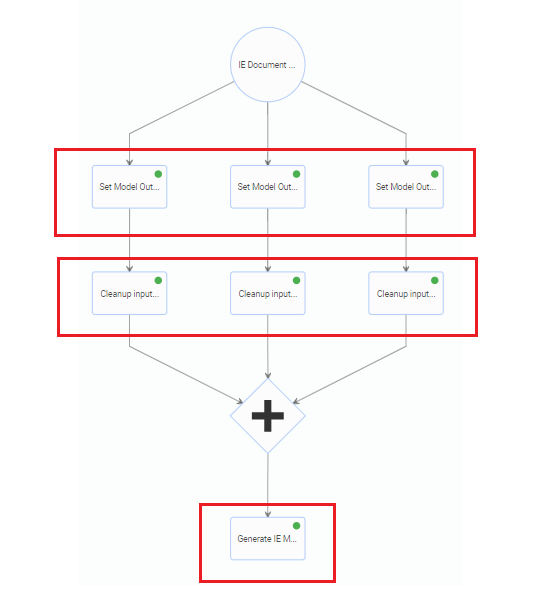
The method receives a DocumentSetInput and ContextId (injected as parameter in the isDocumentSetProcessorRun method before) as parameters to organize document processing. Performs split execution into N threads each of them process document - slit(documentSetInput.uuidsToProcess(). Clear all input inside document processing thread and set as parameter the document id - setParameter(docInput, new DocumentId(uuid));. Then execute action flow for all non-group actions. After the all document threads are completed execute action flow for group actions. This code provides history for 3 documents for actions SET_MODEL_OUTPUT_AS_HUMAN, GENERATE_MODEL_REPORT like this:
@ActionFlow and @Flow
The executeActionFlow(docInput, documentSetInput.actionsToProcess(false)) from the above is one of the document processors extension point pattern. The methods searches all method in the class hierarchy annotated with @ActionFlow annotation find appropriative and call then to obtain CompletableFuture<TaskOutput> for execution flow. Lets look into DocumentProcessorBase and DocumentProcessorBaseFlows:
public interface DocumentProcessorBase extends DpExecutionFlow {
	. . . . .
	String PREPARE_ML = "PREPARE_ML";

	String ML = "ML";
	String STORE_ML_RESULT = "STORE_ML_RESULT";

	String ML_POST_PROCESSING = "ML_POST_PROCESSING";

	@ActionFlow(action = DocumentSet.Action.EXECUTE_MODEL)
	default CompletableFuture<TaskOutput> executeModelActionFlow(TaskInput input) {
		return executeFlow(input, PREPARE_ML, ML, STORE_ML_RESULT, ML_POST_PROCESSING);
	}

	. . . . .
 }

public interface DocumentProcessorBaseFlows extends DocumentProcessorBase {
	. . . . .
	@ActionFlow(action = DocumentSet.Action.SET_MODEL_OUTPUT_AS_HUMAN)
	default CompletableFuture<TaskOutput> setModelOutputAsHumanActionFlow(TaskInput input) {
		return execute(input, SetModelOutputAsHuman.class);
	}
	. . . . .
	@Flow(name = PREPARE_ML, htType = { "ie", "classification" })
	default CompletableFuture<TaskOutput> prepareMlFlowHocr(TaskInput input) {
		return execute(input, PrepareHocrMlTask.class);
	}
	 . . . . .
	@Flow(name = ML)
	default CompletableFuture<TaskOutput> mlFlow(TaskInput input) {
		return execute(input, MlTask.class);
	}
 	. . . . .
	@Flow(name = STORE_ML_RESULT, htType = "ie")
	default CompletableFuture<TaskOutput> storeMlResultFlowIe(TaskInput input) {
		return execute(input, StoreIeMlResultTask.class);
	}
	. . . . .
}
Look at the DocumentProcessorBase. The method instead of calling tasks calls executeFlow methods. The executeFlow method is another document processors extension point pattern. The difference of @ActionFlow to @Flow - action vs name; Action vs String.
The DocumentProcessorBaseFlows define action flow for SET_MODEL_OUTPUT_AS_HUMAN, it executes SetModelOutputAsHuman task. Nothing special here.
Other methods define what actually flow means for the DocumentProcessorBase - they usually do task execution.
@ActionFlow
The ActionFlow is intended to define execution flow for Actions of document processors, therefore only Action enumeration constants can be used.
@Target({ ElementType.METHOD })
@Retention(RetentionPolicy.RUNTIME)
public @interface ActionFlow {

	/**
	 * The Document Processor action the flow is intended for
	 */
	DocumentSet.Action action();

	/**
	 * The Human Task Type the flow is intended for
	 */
	String[] htType() default {};
}
Look at the DocumentsProcessorBaseFlows - it has different task execution for the same action, but different htType. Here are the list of platforms Human Task Type:
Out of the box Human Task Types
| HTT Name | Description | HTT id |
|---|---|---|
| Classification Task | Handles xocr format IE tagging | classification |
| Information Extraction Task | Handles xocr format classification | ie |
| HTML Classification Task | Handles html format IE tagging | html-classification |
| HTML Information Extraction Task | Handles html format classification | html-ie |
| Form Task | Handles forms | form |
@ActionFlow Method contract
The method should satisfy the following contract:
public CompletableFuture<TaskOutput> anyName(TaskInput input)
@ActionFlow lookup algorithm
find methods with @ActionFlow where action == action and htType == DocumentContext.HumanTaskTypeId in current class
find methods with @ActionFlow where action == action and htType == DocumentContext.HumanTaskTypeId in super classes
find methods with @ActionFlow where action == action and htType == DocumentContext.HumanTaskTypeId in implemented interfaces
find methods with @ActionFlow where action == action and htType == "" current class
find methods with @ActionFlow where action == action and htType == "" in super classes
find methods with @ActionFlow where action == action and htType == "" interfaces
@Flow
The Flow is intended to define execution flow for any name, and intended to be a customization point. In platform they defines steps of Actions.
@Target({ ElementType.METHOD })
@Retention(RetentionPolicy.RUNTIME)
public @interface Flow {

	/**
	 * The flow name
	 */
	String name();

	/**
	 * The Human Task Type the flow is intended for
	 */
	String[] htType() default {};

	String FLOW_DOC_TYPE = "flowDocType";

	/**
	 * The Document Type the flow is intended for.
	 * For flexibility, in document type setting could be defined an alias for the name
	 * Use the @{@link Flow#FLOW_DOC_TYPE} key for it.
	 * @return
	 */
	String[] docType() default {};

}
In difference to ActionFlow, the Flow could be defined either to HumanType or DocumentType (i.e. document name). It is useful extension point for customer's automation processes, when you need to have different behavior for flow steps, e.g. ML postprocessing for invoices and bills.
For development purposes, system supports aliases for document type name, for this you should add flowDocType parameter into DocumentType settings and use it in annotation.
@Flow Method contract
The method should satisfy the following contract:
public CompletableFuture<TaskOutput> anyName(TaskInput input)
@Flow lookup algorithm
find methods with @Flow where name == name and docType == docType in current class
find methods with @Flow where action == action and docType == docType in super classes
find methods with @Flow where action == action and docType == docType in implemented interfaces
find methods with @Flow where name == name and htType == DocumentContext.HumanTaskTypeId in current class
find methods with @Flow where action == action and htType == DocumentContext.HumanTaskTypeId in super classes
find methods with @Flow where action == action and htType == DocumentContext.HumanTaskTypeId in implemented interfaces
find methods with @Flow where action == action and htType == "" current class
find methods with @Flow where action == action and htType == "" in super classes
find methods with @Flow where action == action and htType == "" interfaces
So docType has priority over htType, i.e. if there are many @Flow for the same name, the flow with corresponding docType will be selected.
Flows for Document Processors
There are 5 point where extension flows are defined for platforms document processors:
eu.ibagroup.easyrpa.ap.dp.DocumentProcessorBase
eu.ibagroup.easyrpa.ap.dp.DocumentsProcessorBase
eu.ibagroup.easyrpa.ap.dp.DocumentProcessorBaseFlows
eu.ibagroup.easyrpa.ap.dp.DocumentsProcessorBaseFlows
DocumentProcessor flow diagram
Here are the current state of Action and Flows for the Document Processor mode:
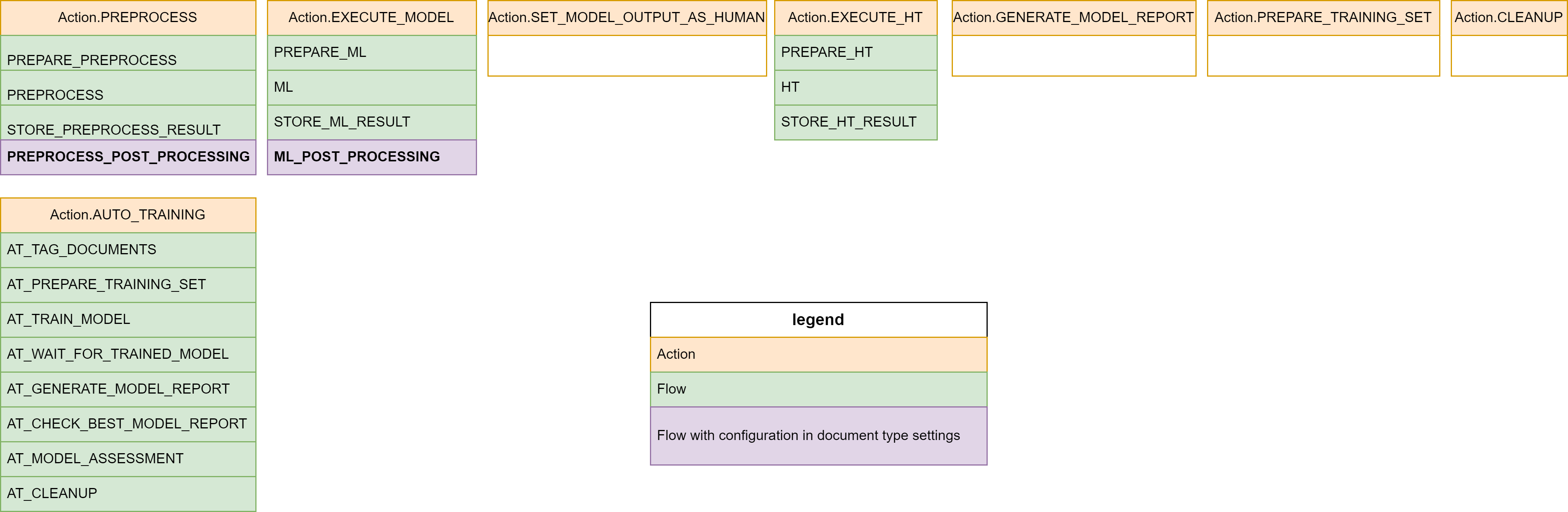
* The PREPROCESS_POST_PROCESSING and ML_POST_PROCESSING flow has possibility to plug additional logic using PostProcessors mechanism, we are going to cover it below.
Document Processor customization
Let's look at the platform's document processor:
@ApModuleEntry(name = "Document Processor", description = "Universal Document Processor for Document Sets.")
@Slf4j
public class DocumentProcessor extends AbstractDocumentProcessor<DpDocument> implements DocumentProcessorBaseFlows, DocumentsProcessorBaseFlows {

	@Override
	public Logger log() {
		return log;
	}

}
There a few code here, because all of the implementation is already defined in the Base interfaces.
The DocumentProcessorBaseFlows:
public interface DocumentProcessorBaseFlows extends DocumentProcessorBase {
	. . . . .
	@Flow(name = PREPARE_ML, htType = { "ie", "classification" })
	default CompletableFuture<TaskOutput> prepareMlFlowHocr(TaskInput input) {
		return execute(input, PrepareHocrMlTask.class);
	}

	@Flow(name = ML)
	default CompletableFuture<TaskOutput> mlFlow(TaskInput input) {
		return execute(input, MlTask.class);
	}

	@Flow(name = STORE_ML_RESULT, htType = { "classification", "html-classification" })
	default CompletableFuture<TaskOutput> storeMlResultFlowCl(TaskInput input) {
		return execute(input, StoreClMlResultTask.class);
	}

	@Flow(name = ML_POST_PROCESSING)
	default CompletableFuture<TaskOutput> mlPostProcessingFlow(TaskInput input) {
		return execute(input, PostProcessMlResultsTask.class);
	}

	@Flow(name = STORE_ML_RESULT, htType = { "classification", "html-classification" })
	default CompletableFuture<TaskOutput> storeMlResultFlowCl(TaskInput input) {
		return execute(input, StoreClMlResultTask.class);
	}

	@Flow(name = STORE_ML_RESULT, htType = "ie")
	default CompletableFuture<TaskOutput> storeMlResultFlowIe(TaskInput input) {
		return execute(input, StoreIeMlResultTask.class);
	}

	@Flow(name = STORE_ML_RESULT, htType = "html-ie")
	default CompletableFuture<TaskOutput> storeMlResultFlowHtmlIe(TaskInput input) {
		return execute(input, StoreIeHtmlMlResultTask.class);
	}
	. . . . .
 }
The DocumentProcessorBase defines an action flow as one by one calls of sub-flows (executeFlow(input, PREPARE_PREPROCESS, PREPROCESS, STORE_PREPROCESS_RESULT, PREPROCESS_POST_PROCESSING)), the sub-flows finally calls tasks. The sub-flow are the point to override by a custom document processors.
public interface DocumentProcessorBase extends DpExecutionFlow {
	. . . . .
	@ActionFlow(action = DocumentSet.Action.PREPROCESS)
	default CompletableFuture<TaskOutput> preprocessActionFlow(TaskInput input) {
		return executeFlow(input, PREPARE_PREPROCESS, PREPROCESS, STORE_PREPROCESS_RESULT, PREPROCESS_POST_PROCESSING);
	}
	. . . . .
	@ActionFlow(action = DocumentSet.Action.EXECUTE_MODEL)
	default CompletableFuture<TaskOutput> executeModelActionFlow(TaskInput input) {
		return executeFlow(input, PREPARE_ML, ML, STORE_ML_RESULT, ML_POST_PROCESSING);
	}
	. . . . .
 }
In the code above the DocumentProcessorBase defines the action EXECUTE_MODEL as subflows calls:
- PREPARE_ML - executes PrepareIeMlTask - defines ML call structure for the current document. The code is Human Task Type dependent, because handles different document format HOCR-IE, HOCR-CL, HTML-IE, HTML-CL
- ML - calls platform OCR task, there is no Human Task Type dependency here
- STORE_ML_RESULT - calls StoreIeMlResultTask task, the same as for the 1st there is dependency on Human Task Type
- ML_POST_PROCESSING - calls PostProcessMlResultsTask the platforms universal ML post processor.
The default ML_POST_PROCESSING task PostProcessMlResultsTask has possibility to change is logic without changing it code, by using additional post processors defined in document type settings. Adding standard or custom PostProcessors is a common practice for Document Processor Flow customization, it is covered in separate article see Post Processing article.
For specific cases here is a possibility to change any flow, let's for example change ML_POST_PROCESSING, and replace platform ML Post processor by our custom task MyCustomPostProcessor, the code will looks like the following:
@ApModuleEntry(name = "My IE Document Processor")
@Slf4j
public class MyIeDocumentProcessor extends AbstractDocumentProcessor<DpDocument> implements DocumentProcessorBaseFlows{

	@Override
	public Logger log() {
		return log;
	}

	@Flow(name = ML_POST_PROCESSING, htType = "ie")
	public CompletableFuture<TaskOutput> mlPostProcessingFlowMy(TaskInput input) {
		return execute(input, MyCustomPostProcessor.class);
	}
	}
Automation Process Flow
Let's return back to the DocumentProcessor and investigate automation process run flow:
public abstract class AbstractDocumentProcessor<D extends DpDocument> extends ApModule implements DocumentProcessorBase, DocumentsProcessorBase, DocumentContextFactory<D> {
. . . . .
	public TaskOutput run() {
		if (isDocumentSetProcessorRun(getInput())) {
			return documentProcessor(getInput()).get();
		} else {
			return processRun(getInput()).get();
		}
	}
. . . . .
	public CompletableFuture<TaskOutput> processRun(TaskInput root) {
		// @formatter:off
		return emptyFlow(root)
				.thenCompose(setParameter(defaultContext()))
				.thenCompose(setParameter( new DocumentSetInput()))
				.thenCompose(execute(GetDocumentsFromStorageTask.class))
				.thenCompose(processDocuments());
		// @formatter:on
	}
. . . . .
	public ContextId defaultContext() {
		return new ContextId(getDocumentRepository().dpDocumentClass().getAnnotation(Entity.class).value(), DataStoreContext.HANDLER_NAME);
	}

	@Override
	public CompletableFuture<TaskOutput> processDocument(TaskInput docInput) {
		return execute(docInput, ImportDocumentFromStorageTask.class).thenCompose(processDocument(true));
	 }
. . . . .
}
In usual AP run there is no input parameters from Document Set and the AP calls processRun method. The methods defines DocumentSet context with DataStoreContext.HANDLER_NAME, defines empty DocumentSetInput, calls task GetDocumentsFromStorageTask and processDocuments. It also override processDocument by adding a ImportDocumentFromStorageTask before default implementation. Let's go through all of them one by one.
DataStoreContext
Document Processor in automation process flow uses DataStoreContext instead DocumentSetContext in 1st mode. It means that document is located in datastore, all document set related references are configured via Automation process configuration parameter. Here is the configuration parameter structure that the handler waiting for:
{ "contextName1": {
			"documentType": "Doc Type 1",
			"workspaceGroup": "Default",
			"model": "model1",
			"runModel": "model1,1.0",
			"storagePath": "path1",
			"bucket": "data",
			. . . .
	 },
	 "contextName2": {
			"documentType": "Doc Type 2",
 			"workspaceGroup": "Default",
			"model": "model2",
			"runModel": "model2,1.0",
			"storagePath": "path2",
			"bucket": "data",
			. . . .
	 },
	. . . .
}
The configuration JSON contains row of maps for every context name, where every map should have:
- documentType - document type name to use in Human Task
- workspaceGroup - the workspace group name to which inject the task
- model - model name to use during model auto training
- runModel - model name and version to use during ML Task call in format <modelName>,<version>
- storagePath - storage path to use to save document
- bucket - storage bucket
The others keys are part of settings (like Document Set settings) where OCR settings can be stored, for example here is configuration for IDPSample:
{
	"classification": {
		"documentType": "IDP Sample Document Classification",
 		"workspaceGroup": "Default",
		"model": "idp_classification",
		"runModel": "idp_classification,1.1.1",
		"storagePath": "idp_sample",
		"exportDocumentSet": "IDP_SAMPLE_CLASSIFICATION",
		"bucket": "data",
		"tesseractOptions": ["-l", "eng", "--psm", "12", "--oem", "3", "--dpi", "150"],
		"imageMagickOptions": ["-units", "PixelsPerInch", "-resample", "150", "-density", "150", "-quality", "100", "-background", "white", "-deskew", "40%", "-contrast", "-alpha", "flatten"]
	}
 . . . . .
}
Document processor's Transfer Objects
The DocumentSetInput is a transfer object (TO) form the eu.ibagroup.easyrpa.ap.dp.tasks.to package.
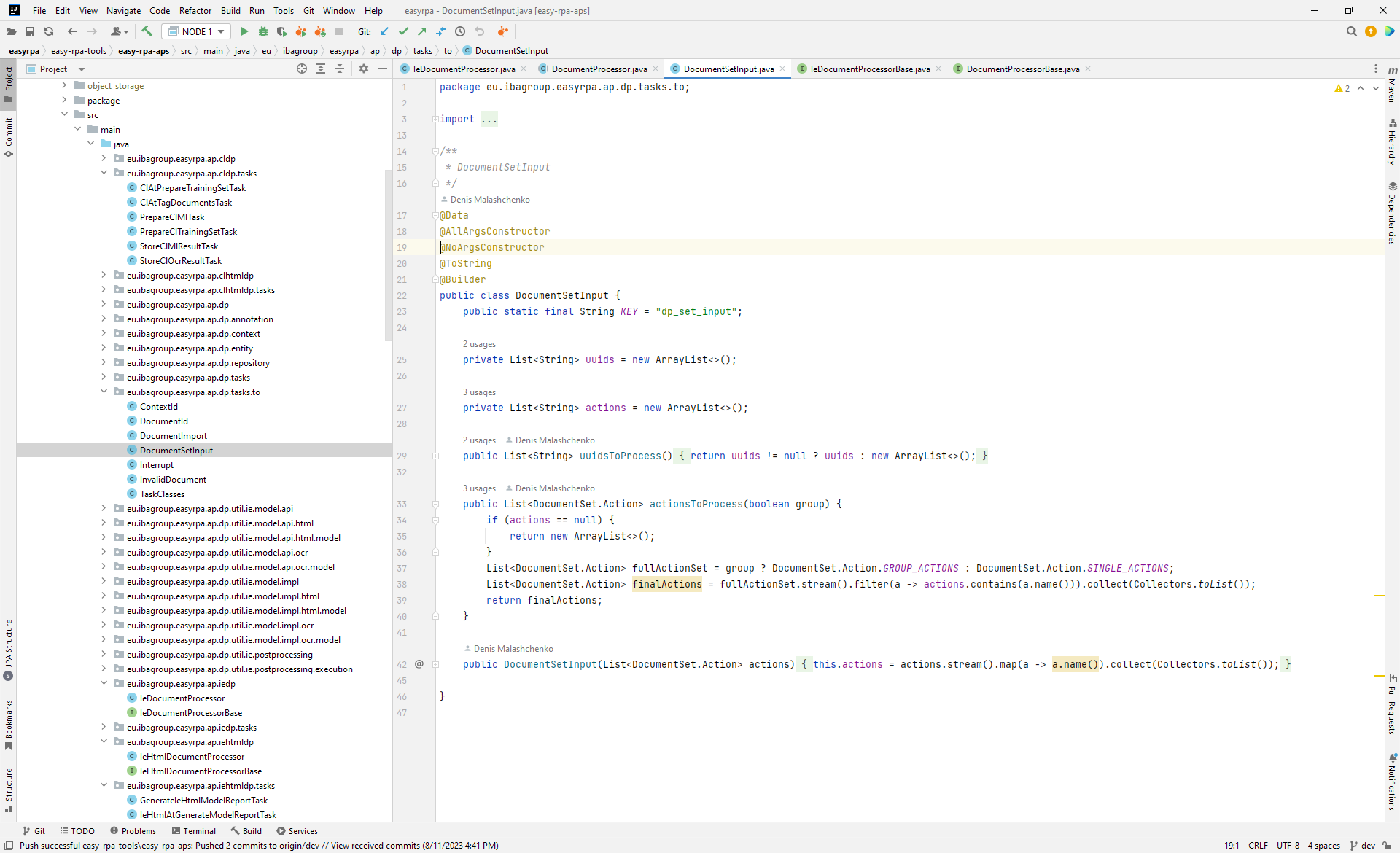
The TO class is intended to use during as an input parameters into document processors methods or task classes. Here are some of the TO classes:
- ContextId - document context id input parameter, defines context name and its handler to use
- DocumentId - document processor document id to use
- DocumentImport - parameter to specify from what path the package needs to be imported into document context
- DocumentSetInput - input parameter that defines set of documents to process
ControlFlow - input parameter that has interrupt flag (that says that document processing flow need to be canceled) and invalidDocument flag - (that says that the current document is invalid)
- TaskClasses - input parameter that specify list of task classes need to be executed one by one
All TO classes has public static final String KEY = "dp_import_input"; field that defined input parameter key to use in get/set/clear parameters methods.
GetDocumentsFromStorageTask
In the code above the .thenCompose(setParameter( new DocumentSetInput())) defines empty set of documents to process as a required input parameter for group document processing. The concrete list of document the GetDocumentsFromStorageTask is defined.
@ApTaskEntry(name = "Get Documents from Storage")
@Slf4j
@InputToOutput(value = { ContextId.KEY })
public class GetDocumentsFromStorageTask extends DpDocumentsTask<DpDocument> implements GetDocumentsFromStorage<DpDocument> {
 . . . . .
	@Output(DocumentSetInput.KEY)
	private DocumentSetInput documentSetInput;
 . . . . .
	@Override
	public void execute() {
		List<String> paths = getNewDocuments();
		documentSetInput = new DocumentSetInput(paths, getDocumentSetInput().getActions());
	}
 . . . . .
 }
It returns all files under specific path according to the specified filter. Here are the configuration parameters that could be used for it:
| parameter | default value | description |
|---|---|---|
| inputFolder | input | storage path to scan |
| fileFilter | regexp filter of files to include |
processDocuments method
The method requires DocumentSetInput input parameter as input documents to split them into process threads:
public interface DocumentProcessorBase extends ExecutionFlow {
 . . . . .
	default Function<TaskOutput, CompletableFuture<TaskOutput>> processDocuments() {
		return (TaskOutput output) -> processDocuments(new TaskInput(output));
	}

	String PROCESS_DOCUMENTS = "PROCESS_DOCUMENTS";

	@Flow(name = PROCESS_DOCUMENTS)
	default CompletableFuture<TaskOutput> processDocuments(TaskInput rootInput) {
		DocumentSetInput documentSetInput = getDocumentSetInput(rootInput);
		ContextId context = getParameter(rootInput, ContextId.class);
		// @formatter:off
		return emptyFlow(rootInput)
				.thenCompose(split(documentSetInput.uuidsToProcess(), (docInput, uuid) -> {
					// Set single document input context
					clearInput(docInput);
					setParameter(docInput, new DocumentId(uuid));
					setParameter(docInput, context);
					log().info("Processing document {}:{}", uuid, context);
					return processDocument(docInput).thenCompose(executeFlow(CLEANUP_INPUT));
				}).merge())
				.thenCompose(setParameter(documentSetInput))
				.thenCompose(setParameter(context));
		// @formatter:on
	}
	. . . . .
 }
It is very similar to document processing documentProcessor method, but without any actions involving, it just calls process document for every splitted document processing thread.
processDocument method
The processDocument is overridden in the DocumentProcessor, it adds additional step to the base implementation:
public abstract class AbstractDocumentProcessor<D extends DpDocument> extends ApModule implements DocumentProcessorBase, DocumentsProcessorBase, DocumentContextFactory<D> {
. . . . .
	@Override
	public CompletableFuture<TaskOutput> processDocument(TaskInput docInput) {
		return execute(docInput, ImportDocumentFromStorageTask.class).thenCompose(processDocument(true));
	}
. . . . .
}
ImportDocumentFromStorageTask
The ImportDocumentFromStorageTask imports document by storage path into DocumentContext:
- creates new document record in datastore/documentSet with new random uuid
- copies document content into storage
- links documentContext to the just created document
For now we don't have enough knowledge to analyze it's code, but doing it a little bit later.
Base processDocument
The base processDocument reuses action flows and defines new flows:
- DocumentSet.Action.PREPROCESS
- DocumentSet.Action.EXECUTE_MODEL
- DocumentSet.Action.SET_MODEL_OUTPUT_AS_HUMAN
- HT_VALIDATE
- DocumentSet.Action.EXECUTE_HT
- HT_STORE_TO_DOC_SET
Here is the flow diagram:
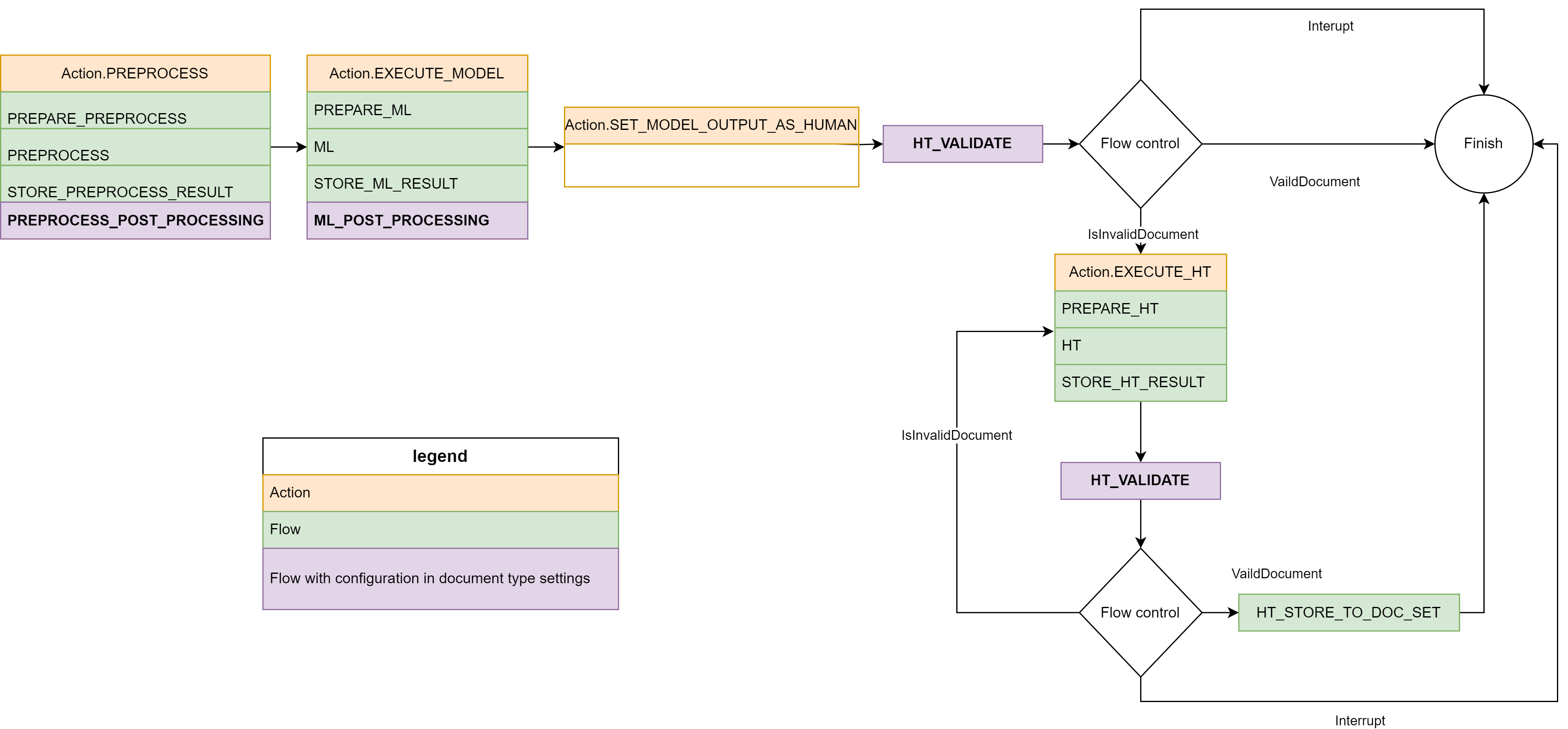
Here is the flow code:
public interface DocumentProcessorBase extends DpExecutionFlow {
 . . . . .
	default CompletableFuture<TaskOutput> processDocument(TaskInput rootInput) {
		return processDocument(rootInput, true);
	}

	String HT_VALIDATE = "HT_VALIDATE";

	String HT_STORE_TO_DOC_SET = "HT_STORE_TO_DOC_SET";

	default CompletableFuture<TaskOutput> processDocument(TaskInput rootInput, boolean preprocess) {
		CompletableFuture<TaskOutput> rootExecutionFlow = preprocess ? executeActionFlow(rootInput, DocumentSet.Action.PREPROCESS) : emptyFlow(rootInput);
		return rootExecutionFlow.thenCompose(executeActionFlow(DocumentSet.Action.EXECUTE_MODEL)).thenCompose(executeActionFlow(DocumentSet.Action.SET_MODEL_OUTPUT_AS_HUMAN))
				.thenCompose(executeFlow(HT_VALIDATE)).thenCompose(o -> htValidationLoop(o, false));
	}

	default Function<TaskOutput, CompletableFuture<TaskOutput>> processDocument(boolean preprocess) {
		return (TaskOutput output) -> processDocument(new TaskInput(output), preprocess);
	}

	default CompletableFuture<TaskOutput> htValidationLoop(TaskOutput validateOutput, boolean afterHuman) {
		if (isInterrupt(validateOutput)) {
			return emptyFlow(validateOutput).thenCompose(clearParameter(ControlFlow.class));
		} else if (isInvalidDocument(validateOutput)) {
			return executeActionFlow(validateOutput, DocumentSet.Action.EXECUTE_HT).thenCompose(executeFlow(HT_VALIDATE)).thenCompose(o -> htValidationLoop(o, true));
		} else if (afterHuman) {
			return executeFlow(validateOutput, HT_STORE_TO_DOC_SET);
		} else {
			return emptyFlow(validateOutput);
		}
	}
	 . . . . .
 }
The document processing flow checks for isInvalidDocument to skip next actions. It is a flag that VALIDATE flows can set to cancel document processing, e.g. if HT_VALIDATE finds out about document from human.
The processDocument has preprocess parameter that requests of the DocumentSet.Action.PREPROCESS processing. The action prepares inputJson that is not necessary if we are processing document again (e.g. using different model).
Now we've covered all points to switch to a custom document processor automation process. Let's look in deep to the one of the platform samples - Information Extraction HTML Sample:
Information Extraction HTML Sample
Here is the sample's code:
@ApModuleEntry(name = "HTML IE Sample", description = "HTML IE Document Processing Sample")
public class IeHtmlSample extends AbstractDocumentProcessor<MlSampleDocument> implements DocumentProcessorBaseFlows {
	. . . . .
	@Flow(name = HT_STORE_TO_DOC_SET, docType = "HTML_IE")
	public CompletableFuture<TaskOutput> exportDocumentToDocSet(TaskInput input) {
		return executeFlow(input, DOCUMENT_EXPORT_TO_DOC_SET);
	}

	@Override
	public CompletableFuture<TaskOutput> processDocument(TaskInput docInput) {
		return super.processDocument(docInput).thenCompose(execute(StoreIeHtmlMlSampleDocumentData.class));
	}
}
It is based on base flows and reuse base processDocuments, but extends document entity for adding additional fields (it also requires to define new repository for the entity):
@Data
@NoArgsConstructor
@AllArgsConstructor
@Entity(value = "ML_SAMPLE_DOCUMENTS")
@ToString
public class MlSampleDocument extends DpDocument {

	@Column("ie_model_result")
	private MlTaskUtils.IeEntities ieModelResult;

	@Column("ie_result")
	private MlTaskUtils.IeEntities ieResult;

	@Column("error_message")
	private String errorMessage;
}

public interface MlSampleDocumentRepository extends DpDocumentRepository< MlSampleDocument > {
}
The method exportDocumentToDocSet just link existing DOCUMENT_EXPORT_TO_DOC_SET flow to the HT_STORE_TO_DOC_SET to be called after HT, It saves human processed HT into a documentSet (by the name defined in DocumentContext.settings.exportDocumentSet key):
public DocumentProcessorBaseFlows extends DocumentProcessorBase {
. . . . .
	 @Flow(name = DOCUMENT_EXPORT_TO_DOC_SET, htType = "html-ie")
	default CompletableFuture<TaskOutput> exportDocumentToDocSetFlowHtmlIe(TaskInput input) {
		return execute(input, HtmlDocumentExportToDocSetTask.class);
	}
. . . . .
}

@ApTaskEntry(name = "Export HTML Document to Document Set")
public class HtmlDocumentExportToDocSetTask extends DpDocumentTask<DpDocument> implements DocumentTaskBase<DpDocument>, DocumentExportTaskBase<DpDocument> {
. . . . .
	@Override
	public void execute() {
		addDocumentToDocumentSetTask(this::exportHtmlDocumentHandler);
	}
. . . . .
}

public interface DocumentExportTaskBase<D extends DpDocument> {
. . . . .
	String EXPORT_DOCUMENT_SET_KEY = "exportDocumentSet";

	@SneakyThrows
	default void addDocumentToDocumentSetTask(Consumer<DocumentContext.DocumentExportContext<D>> exportHandler) {
		String documentSetName = (String) documentContext().getSettings().get(EXPORT_DOCUMENT_SET_KEY);
		if (documentSetName != null) {
			File exportFile = documentContext().exportDocument(exportHandler);
			try {
				DocumentContext<D> importContext = contextHandler(new ContextId(documentSetName));
				if (!importContext.isDocumentExist((documentContext().getDocumentId()))) {
					log().info("Adding document to DocumentSet '{}'.", documentSetName);
					importContext.importDocuments(exportFile);
				} else {
					log().info("Document with '{}' exist in the DocumentSet '{}', skipping.", documentContext().getDocumentId(), documentSetName);
				}
			} finally {
				if (exportFile != null) {
					exportFile.deleteOnExit();
				}
			}
		}
	}
. . . . .
}
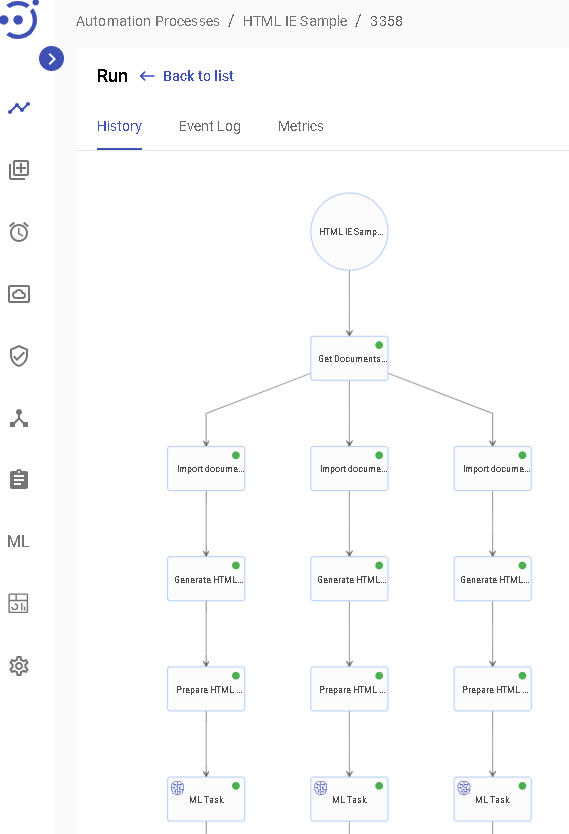
Here is history of the run:
Implement Document Processor tasks
DpDocumentTask
In the sample above we added the StoreIeHtmlMlSampleDocumentData task after standard processDocument as a consumer of IE results, let's got deep into the code and find out how to write a document processor task:
@ApTaskEntry(name = "Store IE HTML ML Result")
@Slf4j
@InputToOutput(value = {ContextId.KEY, DocumentId.KEY})
public class StoreIeHtmlMlSampleDocumentData extends DpDocumentTask<MlSampleDocument> implements DocumentTaskBase<MlSampleDocument>, IeHtmlValidatorBase<MlSampleDocument> {

	@Inject
	@Getter
	private MlSampleDocumentRepository documentRepository;

	@Override
	public Logger log() {
		return log;
	}

	@Override
	public void execute() {
		MlSampleDocument document = documentContext().getDocument();
		boolean isValidDocument = isValidDocument();
		if (isValidDocument) {
			document.setIeResult(getExtractedJson());

		} else {
			document.setErrorMessage(String.valueOf(
					OutputJson.fromOutputJson(documentContext()).getMetadata("error_message", "Document has not been recognized by human as a valid document.")));
		}

		documentContext().updateDocument(!isValidDocument ? DocumentSet.Status.ERROR : DocumentSet.Status.READY);
	}

}
The document processor task works with document using document context, to do this it should extends DpDocumentTask<D extends DpDocument> and provide its operation document entity (for IeHtmlSample it is MlSampleDocument) and provide document repository in case if document extends DpDocument. The task has access to the DocumentContext via documentContext() method. Going deep to DpDocumentTask<D extends DpDocument> class we will see that task requires DocumentId. This parameter links DocumentContext to a concreate document.
public abstract class DpDocumentTask<D extends DpDocument> extends DpBaseTask<D> {

	@Input(DocumentId.KEY)
	@Getter
	private DocumentId documentId;
	. . . .
}
The task class has annotation @InputToOutput(value = { ContextId.KEY, DocumentId.KEY }) that pass this input parameter to the next tasks, they are required for one document processing thread and child of DpDocumentTask, that works with concreate document.
In the code above we also added IeHtmlValidatorBase<IeHtmlDocument> into implementation, the interface contains default methods that provide access to the extracted entities and validation API:
public interface IeHtmlValidatorBase<D extends DpDocument> extends IeValidatorBase<D> {
	@Override
	default ExtractedEntities getExtractedEntities() {
		return IeHtmlOutputJson.fromOutputJson(documentContext()).getExtractedEntities();
	}
}

public interface IeValidatorBase<D extends DpDocument> extends IePostProcessorBase<D>, ValidatorBase<D> {
	. . . .
	default boolean validateEntity(String entityName, Predicate<String> validator, ValidationMessage messageOnFail) {
	. . . .
	default boolean validateEntityMultipleValues(String entityName, Predicate<List<String>> validator, ValidationMessage messageOnFail) {
	. . . .
	default boolean customEntityValidate(Supplier<List<ValidationMessage>> validator) {
	. . . .
	default ExtractedEntities getExtractedEntities() {
	. . . .
}

public interface IePostProcessorBase<D extends DpDocument> extends HasDocumentContext<D>, ExtractedEntities {
	 . . . .
	 default Map<String, Object> getExtractedJson() {
	 . . . .
}
The task class could obtains entities values using ExtractedEntities API:
public interface ExtractedEntities {
	. . . .
	default String getValue(String name){
	. . . .
	default <T> T getValueAs(String name, Function<String, T> parser){
	. . . .
	default Integer getValueAsInteger(String name){
	. . . .
	default Long getValueAsLong(String name){
	. . . .
	default Float getValueAsFloat(String name){
	. . . .
	default Double getValueAsDouble(String name){
	. . . .
	default BigDecimal getValueAsBigDecimal(String name){
	. . . .
	default BigDecimal getValueAsAmount(String name) {
	. . . .
	default String getValueAsPossibleValue(String name, String... possibleValues){
	. . . .
	default Integer getValueAsLong(String name){
	. . . .
	default Date getValueAsDate(String name, List<String> possibleFormats){
	. . . .
	default String getValue(String name){
	. . . .
	default String getValue(String name, int index) {
	. . . .
	. . . .
	. . . .
}
For validate function predicate and getValueAs function are using the same OOTB parsers defined in the package:
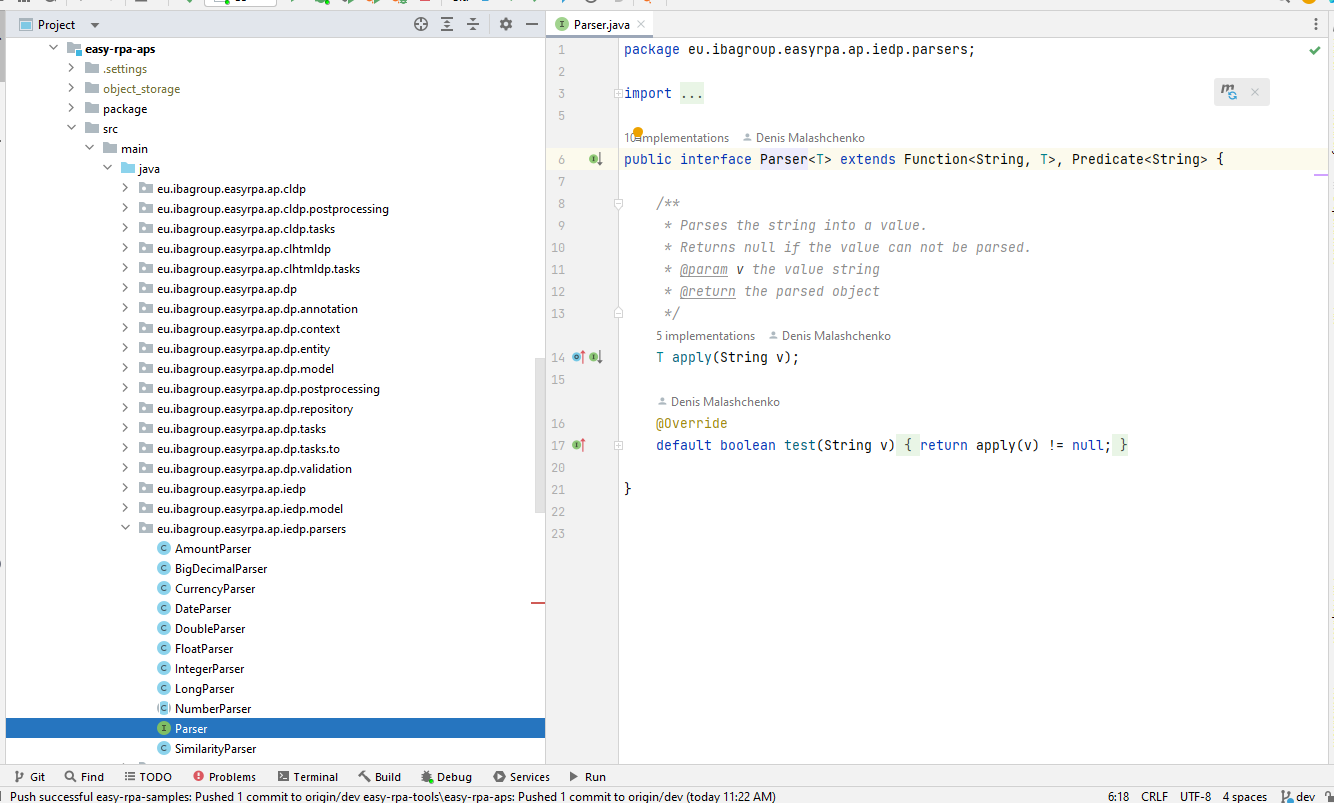
PostProcessor Task
We've already mentioned above about Post Processing. there are a lot of OTTB classes that could be plugged into document type JSON to run for document after PREPROCESS ML and VALIDE phases. Let's cover how to create a custom post processor. In the Information Extraction HTML Sample it is IeHtmlStoreMlResult that is included as postprocessor into "HTML IE Sample" document type JSON:
{
	 . . . .
	 "mlPostProcessors": [
		{
		"name": "ieHtmlSampleStoreMlResults"
		}
	]
}
And here is its code:
@PostProcessorStrategies("html-ie")
public class StoreIeHtmlMlSampleDocumentResult extends BasePostProcessor<MlSampleDocument> implements IeHtmlPostProcessorBase<MlSampleDocument> {

	@Inject
	@Getter
	private MlSampleDocumentRepository documentRepository;

	@PostProcessorMethod("storeIeHtmlMlSampleDocumentResult")
	public void storeIeHtmlMlSampleDocumentResult() {
		IeHtmlDocument document = documentContext().getDocument();
		document.setIeModelResult(getExtractedEntities());
	}

}
It stores model extracted entities into a separate column of the document and do nothing with model output JSON. The class has access to document and ExtractedEntities API via IeHtmlPostProcessorBase<MlSampleDocument>.
Validator Task
Validator is actually is a post processor the only a difference is the meaning of providing result, it raises validation messages, the Post Processing contains OOTB ones. Let's cover how to create a custom validator. In the Information Extraction HTML Sample it is IeHtmlInvoiceValidator that is included as postprocessor into "HTML IE Sample" document type JSON:
{
	 . . . .
	"validators": [
		{
		"name": "ieHtmlSampleValidator"
		}
	]
}
And here is its code:
@PostProcessorStrategies("html-ie")
public class IeHtmlMlSampleDocumentInvoiceValidator extends BasePostProcessor<MlSampleDocument> implements IeHtmlValidatorBase<MlSampleDocument> {

	@Inject
	@Getter
	private MlSampleDocumentRepository documentRepository;

	@PostProcessorMethod("ieHtmlMlSampleDocumentInvoiceValidator")
	public void ieHtmlMlSampleDocumentInvoiceValidator() {
		validateEntity("Order Number", s -> s.matches("^\\d{4}$"), ValidationMessage.error("Order Number should be 4 digit."));
		validateEntity("Order Date", new DateParser("dd/MM/YY"), ValidationMessage.error("Order Date should be a date of dd/MM/YY format."));
		validateEntity("Total", new AmountParser(), ValidationMessage.error("Total should be a amount."));
	}

}
The validators check entity values using validation API from IeHtmlValidatorBase<MlSampleDocument>
DpDocumentsTask
For document group action tasks there is DpDocumentsTask base class, it requires DocumentSetInput parameter as a list of document uuds. It should be used for group action like generate model report for selected documents and so on. The child tasks has the same access to DocumentContext but restricted to use only group method (f.e. documentContext().getDocument() throws IllegalstateException because no document id specified)
public abstract class DpDocumentsTask<D extends DpDocument> extends DpBaseTask<D> {

	@Input(DocumentSetInput.KEY)
	@Getter
	private DocumentSetInput documentSetInput;
. . . .
}
The child task classes should have annotation @InputToOutput(value = { ContextId.KEY, DocumentSetInput.KEY })
Platform ML task implementation logic
In the task hierarchy above there is 'implements DocumentTaskBase':
@ApTaskEntry(name = "Store IE HTML ML Result")
@Slf4j
@InputToOutput(value = {ContextId.KEY, DocumentId.KEY})
public class StoreIeHtmlMlSampleDocumentData extends DpDocumentTask<MlSampleDocument> implements DocumentTaskBase<MlSampleDocument>, IeHtmlValidatorBase<MlSampleDocument> {
	. . . .
}
This implementation actually brings real platform ML task logic into task, here are the list of document processing task logic to reuse:
- AutoTrainingTaskBase - provides auto training task methods implementation
- ClModelReportTaskBase - provides classification model report task implementation
- DocumentExportTaskBase - provide document export task implementation
- DocumentTaskBase - provide common document processing task implementation
- IeModelReportTaskBase - provides IE model report task implementation
- TrainingSetTaskBase- provides task for training set generations
Switch Document Context
Let's look at the case when we need to run different models on the document: classification, and the Information Extraction according to classified result. This is covered by Intelligent Document Processing (IDP) sample. Here is its AP code:
@ApModuleEntry(name = "IDP Sample", description = "Intelligent Document Processing Sample")
public class IdpSample extends DocumentProcessor<IdpDocument> implements DocumentProcessorBaseFlows {
	. . . . .
	@SneakyThrows
	@Override
	public CompletableFuture<TaskOutput> processRun(TaskInput root) {
		// @formatter:off
		return executeTasks(root, cleanupInvoicePlane ? CleanUpDemoTask.class : null)
				.thenCompose( output->super.processRun( new TaskInput(output)) );
		// @formatter:on
	}
	. . . . .
	@Override
	public CompletableFuture<TaskOutput> processDocument(TaskInput docInput) {
		return execute(docInput, ImportDocumentFromStorageTask.class).thenCompose(processDocument(true)).thenCompose(processDocumentOnContexts(IdpSwitchToIeTask.class))
				.thenCompose(execute(IdpCategoryToTask.class)).thenCompose(ieOutput -> isInvalidDocument(ieOutput) ? emptyFlow(ieOutput) : executeTasks(ieOutput));
	}
}
In the processRun method we can observe how to perform additional tasks before document processing (here could be any preparation steps of UC). The most interest here is the processDocument customization. The difference with DocumentProcessor is after .thenCompose(processDocumentOnContexts(IdpSwitchToIeTask.class)).
The processDocumentOnContexts method actually repeats call of processDocument(false) for every context switcher passed, i.e. it perform ML and HT calls for passed context:
public interface DocumentProcessorBase extends DpExecutionFlow {
	. . . . .
	default Function<TaskOutput, CompletableFuture<TaskOutput>> processDocument(boolean preprocess) {
		return (TaskOutput output) -> processDocument(new TaskInput(output), preprocess);
	}
	. . . . .
	default CompletableFuture<TaskOutput> processDocumentOnContexts(TaskInput docInput, Class<? extends ApExecutable>... contextSwitchers) {
		CompletableFuture<TaskOutput> executionFlow = emptyFlow(docInput);
		for (Class<? extends ApExecutable> s : contextSwitchers) {
			executionFlow = executionFlow.thenCompose(prevDocProcessingOutput -> isInterrupt(prevDocProcessingOutput)
					? emptyFlow(prevDocProcessingOutput).thenCompose(clearParameter(ControlFlow.class))
					: execute(prevDocProcessingOutput, s).thenCompose(processDocument(false)));
		}
		return executionFlow;
	}

	default Function<TaskOutput, CompletableFuture<TaskOutput>> processDocumentOnContexts(Class<? extends ApExecutable> contextSwitchers) {
		return (TaskOutput output) -> processDocumentOnContexts(new TaskInput(output), contextSwitchers);
	}
	. . . . .
}

@ApTaskEntry(name = "Switch to IE")
@InputToOutput(value = { ContextId.KEY, DocumentId.KEY })
public class IdpSwitchToIeTask extends IdpDocumentTask {
	@Output(ContextId.KEY)
	private ContextId contextId;
	. . . . .
	@Override
	public void execute() throws Exception {
		IdpDocument document = documentContext().getDocument();
		contextId = getContextId();
		contextId.setName(document.getDocumentType());
	}
}
The context switcher IdpSwitchToIeTask change context name in the ContextId parameter for the next task, the configuration parameter for the IDPSample has the same dataStore and storagePath for all context (i.e. the same physical target), that performs ML and HT with different DocumentType and ML:
{
	"classification": {
		"documentType": "IDP Sample Document Classification",
		"model": "idp_classification",
		"runModel": "idp_classification,1.1.1",
		"storagePath": "idp_sample",
		"exportDocumentSet": "IDP_SAMPLE_CLASSIFICATION",
		"bucket": "data",
		"tesseractOptions": [
			"-l",
			"eng",
			"--psm",
			"12",
			"--oem",
			"3",
			"--dpi",
			"150"
		],
		"imageMagickOptions": [
			"-units",
			"PixelsPerInch",
			"-resample",
			"150",
			"-density",
			"150",
			"-quality",
			"100",
			"-background",
			"white",
			"-deskew",
			"40%",
			"-contrast",
			"-alpha",
			"flatten"
		]
	},
	"Invoice": {
		"documentType": "IDP Sample Invoice",
		"model": "idp_sample_invoice",
		"runModel": "idp_sample_invoice,1.0.11",
		"storagePath": "idp_sample",
		"exportDocumentSet": "IDP_SAMPLE_INVOICE",
		"task": "eu.ibagroup.sample.ml.idp.tasks.AddInvoiceTask",
		"bucket": "data",
		"tesseractOptions": [
			"-l",
			"eng",
			"--psm",
			"12",
			"--oem",
			"3",
			"--dpi",
			"150"
		],
		"imageMagickOptions": [
			"-units",
			"PixelsPerInch",
			"-resample",
			"150",
			"-density",
			"150",
			"-quality",
			"100",
			"-background",
			"white",
			"-deskew",
			"40%",
			"-contrast",
			"-alpha",
			"flatten"
		]
	},
	"Remittance Advice": {
		"documentType": "IDP Sample Remittance Advice",
		"model": "idp_ie_remittance",
		"runModel": "idp_ie_remittance,0.0.10",
		"storagePath": "idp_sample",
		"exportDocumentSet": "IDP_SAMPLE_REMITTANCE_ADVICE",
		"task": "eu.ibagroup.sample.ml.idp.tasks.AddPaymentTask",
		"bucket": "data",
		"tesseractOptions": [
			"-l",
			"eng",
			"--psm",
			"12",
			"--oem",
			"3",
			"--dpi",
			"150"
		],
		"imageMagickOptions": [
			"-units",
			"PixelsPerInch",
			"-resample",
			"150",
			"-density",
			"150",
			"-quality",
			"100",
			"-background",
			"white",
			"-deskew",
			"40%",
			"-contrast",
			"-alpha",
			"flatten"
		]
	}
}
Create/Import/Export Document in/from/to DocumentContext
We've already faced with ImportDocumentFromStorageTask (see above) that creates document in the DocumentSet from file in a storage. Now we can look deep inside to see how it works:
The task class uses documentContext() methods to do this. Here are the documentContext methods that could be used for creation/import/export documents:
public interface DocumentContext<D extends DpDocument> extends EntityDef {
	. . . . .
	 default void createNewFromFile(File file, Consumer<D> customizer) {
	. . . . .
	 default void createNewFromPackageFile(String uuid, File exportFile) {
	. . . . .
	 default void createNewFromStorageFile(String path, Consumer<D> customizer) {
	. . . . .
	 void importDocuments(File exportFile);
	. . . . .
	 default File exportDocument(Consumer<DocumentExportContext<D>> exportHandler) {
	. . . . .
}
CreateNew
The creates methods have similar result, but use different document source. There are ready tasks for creating new document:
@ApTaskEntry(name = "Import document from storage")
@InputToOutput(value = { ContextId.KEY })
public class ImportDocumentFromStorageTask extends DpDocumentTask<DpDocument> implements DocumentTaskBase<DpDocument> {
 . . . . .
	@Output(DocumentId.KEY)
	private DocumentId documentId;

	@Override
	public void execute() {
		String path = getDocumentId().getUuid();
		documentContext().createNewFromStorageFile(path, document -> {
			document.setName("Document " + document.getUuid());
			document.setNotes("Document for " + path);
		});
		. . . . .
		documentId = getDocumentId();
		documentId.setUuid(documentContext().getDocumentId());
	}
}

@ApTaskEntry(name = "Import document from file")
@InputToOutput(value = { ContextId.KEY })
public class ImportDocumentFromFileTask extends DpDocumentTask<DpDocument> implements DocumentTaskBase<DpDocument> {
	. . . . .
	@Output(DocumentId.KEY)
	private DocumentId documentId;
	 . . . . .
	@Override
	public void execute() {
		File file = new File(getDocumentId().getUuid());
		documentContext().createNewFromFile(file, document -> {
			document.setName("Document " + document.getUuid());
			document.setNotes("Document for " + file.getName());
		});
 	 . . . . .
		documentId = getDocumentId();
		documentId.setUuid(documentContext().getDocumentId());

	}
}
Import
The import method works with DocumentSet data package format zip and switches to the document from imported package (do not generates new random uuid). Here is a task for the import:
@ApTaskEntry(name = "Import Document")
@InputToOutput(value = { ContextId.KEY, DocumentId.KEY })
public class DocumentImportTask extends DpDocumentTask<DpDocument> implements DocumentTaskBase<DpDocument> {
	@Input(DocumentImport.KEY)
	private DocumentImport documentImport;
	 . . . . .
	@Override
	public void execute() {
		log.info("Importing document into context {}", documentImport);
		documentContext().importDocuments(new File(documentImport.getPkgPath()));
	}
}
And the flow definition in the DocumentProcessorBase:
public interface DocumentProcessorBase extends DpExecutionFlow {
	. . . . .
	default Function<TaskOutput, CompletableFuture<TaskOutput>> importDocument() {
		return (TaskOutput output) -> importDocument(new TaskInput(output));
	}

	default CompletableFuture<TaskOutput> importDocument(TaskInput rootInput) {
		ContextId context = getParameter(rootInput, ContextId.class);
		CompletableFuture<TaskOutput> result = executeFlow(rootInput, DOCUMENT_IMPORT);
		if (result == null) {
			throw new IllegalStateException("There is no import flow '" + DOCUMENT_IMPORT + "' defined for context " + context);
		}
		return result;
	}

	String DOCUMENT_IMPORT = "DOCUMENT_IMPORT";

	@Flow(name = DOCUMENT_IMPORT)
	default CompletableFuture<TaskOutput> documentImportFlow(TaskInput input) {
		return execute(input, DocumentImportTask.class);
	}
	. . . . .
}
Export
The export method provides the DocumentSet data package format zip. It requires exportHandler that knows how to create a package file for a specific document (Platform code provide handlers for HOCR and HTML documents). Here are task classes that platform provides for them:
@ApTaskEntry(name = "Export HOCR Document")
@InputToOutput(value = { ContextId.KEY, DocumentId.KEY })
public class HocrDocumentExportTask extends DpDocumentTask<DpDocument> implements DocumentTaskBase<DpDocument>, DocumentExportTaskBase<DpDocument> {
	@Output(DocumentImport.KEY)
	private DocumentImport documentImport;
	. . . . .
	@Override
	public void execute() {
		File result = documentContext().exportDocument(this::exportHocrDocumentHandler);
		documentImport = new DocumentImport(result.getAbsolutePath());
	}
}

@ApTaskEntry(name = "Export HTML Document")
@InputToOutput(value = { ContextId.KEY, DocumentId.KEY })
public class HtmlDocumentExportTask extends DpDocumentTask<DpDocument> implements DocumentTaskBase<DpDocument>, DocumentExportTaskBase<DpDocument> {
	@Output(DocumentImport.KEY)
	private DocumentImport documentImport;
	. . . . .
	@Override
	public void execute() {
		File result = documentContext().exportDocument(this::exportHtmlDocumentHandler);
		documentImport = new DocumentImport(result.getAbsolutePath());
	}
}
And the flow definition in the DocumentProcessorBase and DocumentProcessorBaseFlows:
public interface DocumentProcessorBase extends DpExecutionFlow {
	. . . . .
	 default Function<TaskOutput, CompletableFuture<TaskOutput>> exportDocument() {
		return (TaskOutput output) -> exportDocument(new TaskInput(output));
	}

	default CompletableFuture<TaskOutput> exportDocument(TaskInput rootInput) {
		ContextId context = getParameter(rootInput, ContextId.class);
		CompletableFuture<TaskOutput> result = executeFlow(rootInput, DOCUMENT_EXPORT);
		if (result == null) {
			throw new IllegalStateException("There is no import flow '" + DOCUMENT_EXPORT + "' defined for context " + context);
		}
		return result;
	}

	String DOCUMENT_EXPORT = "DOCUMENT_EXPORT";
	 . . . . .
}

public interface DocumentProcessorBaseFlows extends DocumentProcessorBase {
	. . . . .
	@Flow(name = DOCUMENT_EXPORT, htType = "ie")
	default CompletableFuture<TaskOutput> documentExportFlowIe(TaskInput input) {
		return execute(input, HocrDocumentExportTask.class);
	}

	@Flow(name = DOCUMENT_EXPORT, htType = "classification")
	default CompletableFuture<TaskOutput> documentExportFlowCl(TaskInput input) {
		return execute(input, HocrDocumentExportTask.class);
	}

	@Flow(name = DOCUMENT_EXPORT, htType = "html-classification")
	default CompletableFuture<TaskOutput> documentExportFlowHtmlCl(TaskInput input) {
		return execute(input, HtmlDocumentExportTask.class);
	}

	@Flow(name = DOCUMENT_EXPORT, htType = "html-ie")
	default CompletableFuture<TaskOutput> documentExportFlowHtmlIe(TaskInput input) {
		return execute(input, HtmlDocumentExportTask.class);
	}
	. . . . .
 }
Export To DocumentSet
When document has been processed by human it is useful to copy it into a DocumentSet for autotraining. Here are some tasks for this:
@ApTaskEntry(name = "Export HOCR Document to Document Set")
@InputToOutput
public class HocrDocumentExportToDocSetTask extends DpDocumentTask<DpDocument> implements DocumentTaskBase<DpDocument>, DocumentExportTaskBase<DpDocument> {
	 . . . . .
	 @Override
	public void execute() {
		addDocumentToDocumentSetTask(this::exportHocrDocumentHandler);
	}
}

@ApTaskEntry(name = "Export HTML Document to Document Set")
@InputToOutput
public class HtmlDocumentExportToDocSetTask extends DpDocumentTask<DpDocument> implements DocumentTaskBase<DpDocument>, DocumentExportTaskBase<DpDocument> {
	. . . . .
	@Override
	public void execute() {
		addDocumentToDocumentSetTask(this::exportHtmlDocumentHandler);
	}
}
And the flow definition in the DocumentProcessorBase and DocumentProcessorBaseFlows:
public interface DocumentProcessorBaseFlows extends DocumentProcessorBase {
	. . . . .
	 default Function<TaskOutput, CompletableFuture<TaskOutput>> exportDocumentToDocSet() {
		return (TaskOutput output) -> exportDocument(new TaskInput(output));
	}

	default CompletableFuture<TaskOutput> exportDocumentToDocSet(TaskInput rootInput) {
		ContextId context = getParameter(rootInput, ContextId.class);
		CompletableFuture<TaskOutput> result = executeFlow(rootInput, DOCUMENT_EXPORT_TO_DOC_SET);
		if (result == null) {
			throw new IllegalStateException("There is no import flow '" + DOCUMENT_EXPORT_TO_DOC_SET + "' defined for context " + context);
		}
		return result;
	}
	 . . . . .
	 String DOCUMENT_EXPORT_TO_DOC_SET = "DOCUMENT_EXPORT_TO_DOC_SET";
		. . . . .
	 }

public interface DocumentProcessorBaseFlows extends DocumentProcessorBase {
	 . . . . .
	@Flow(name = DOCUMENT_EXPORT_TO_DOC_SET, htType = { "ie", "classification" })
	default CompletableFuture<TaskOutput> exportDocumentToDocSetFlowHocr(TaskInput input) {
		return execute(input, HocrDocumentExportToDocSetTask.class);
	}

	@Flow(name = DOCUMENT_EXPORT_TO_DOC_SET, htType = { "html-classification", "html-ie" })
	default CompletableFuture<TaskOutput> exportDocumentToDocSetFlowHtml(TaskInput input) {
		return execute(input, HtmlDocumentExportToDocSetTask.class);
	}
	. . . . .
}
Propagate between DocumentContexts
The IDPSample above works with document context where physical storage is the same. Let's cover case when we need to work with document contexts from different places, e.g. with DocumentSets. Here is modified IDPSample, that stores documents in different DocumentSets:
@ApModuleEntry(name = "IDP Sample (on DocumentSet)", description = "Intelligent Document Processing Sample")
public class IdpSampleDocSet extends DocumentProcessor<IdpDocument> implements DocumentProcessorBaseFlows {
	 . . . . .

	@Configuration("configuration")
	private Map<String, Object> configuration;
	 . . . . .
	@Override
	public ContextId defaultContext() {
		String documentSetName = (String) ((Map<String, Object>) configuration.get("classification")).get(DocumentExportTaskBase.EXPORT_DOCUMENT_SET_KEY);
		return new ContextId(documentSetName, ContextId.DEFAULT_HANDLER, IdpDocument.class);
	}

	@Flow(name = HT_STORE_TO_DOC_SET, docType = { "IDP_CL", "IDP_INVOICE", "IDP_REMITTANCE" })
	public CompletableFuture<TaskOutput> documentExportFlowIdp(TaskInput input) {
		return emptyFlow(input);
	}

	@Override
	public CompletableFuture<TaskOutput> processDocument(TaskInput docInput) {
		return execute(docInput, ImportDocumentFromStorageTask.class).thenCompose(processDocument(true)).thenCompose(processDocumentOnContexts(IdpSwitchToIeDocSetTask.class))
				.thenCompose(execute(IdpCategoryToTask.class)).thenCompose(ieOutput -> isInvalidDocument(ieOutput) ? emptyFlow(ieOutput) : executeTasks(ieOutput));
	}
	 . . . . .
}


@ApTaskEntry(name = "Switch to IE DocSet")
@InputToOutput(value = { ContextId.KEY, DocumentId.KEY })
public class IdpSwitchToIeDocSetTask extends IdpDocumentTask implements DocumentExportTaskBase<IdpDocument> {
	. . . . .
	@Output(ContextId.KEY)
	private ContextId contextId;

	@Configuration("configuration")
	private Map<String, Object> configuration;
	. . . . .
	@Override
	public void execute() throws Exception {
		IdpDocument document = documentContext().getDocument();
		File tmp = null;
		try {
			tmp = documentContext().exportDocument(this::exportHocrDocumentHandler);
			String documentSetName = (String) ((Map<String, Object>) configuration.get(document.getDocumentType())).get("exportDocumentSet");
			contextHandler(new ContextId(documentSetName)).importDocuments(tmp);
			contextId = getContextId();
			contextId.setName(documentSetName);
		} finally {
			if (tmp != null && tmp.exists()) {
				tmp.deleteOnExit();
			}
		}
	}
}